

Cashier Report
The Cashier Report calculates the sales totals for that cashier on the terminal where the cashier performed the sales.
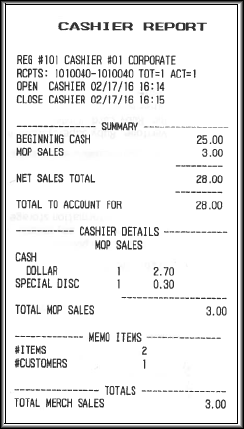
Report Details
TITLE: CASHIER REPORT
REG#: Register for which the Cashier Report was generated.
CASHIER#: ID and name of the employee who used the register.
RCPTS: Beginning and ending receipt numbers issued during the cashier period.
TOT: Total number of receipts printed on this terminal.
ACT: Total number of receipts used by this cashier.
OPEN CASHIER: Date and time this cashier started using the register.
CLOSE CASHIER: Date and time this register was closed.
SUMMARY
BEGINNING CASH: Amount with which cashier started the drawer.
MOP SALES: Total amount from the MOP SALES section.
NET SALES TOTAL: Total amount in sales transacted for the drawer.
TOTAL TO ACCCOUNT FOR: Total amount that should be in the closed drawer.
CASHIER DETAILS
MOP SALES: Summary of sales by method of payment.
CASH: Cash summary of sales by MOP.
SPECIAL DISC: Special discount summary of sales by MOP.
TOTAL MOP SALES: Total amount of sales by MOP.
MEMO ITEMS
#ITEMS: Quantity of items sold.
#CUSTOMERS: Individual transactions.
TOTALS
TOTAL MERCH SALES: Total amount of merchandise sales.