

Department Report
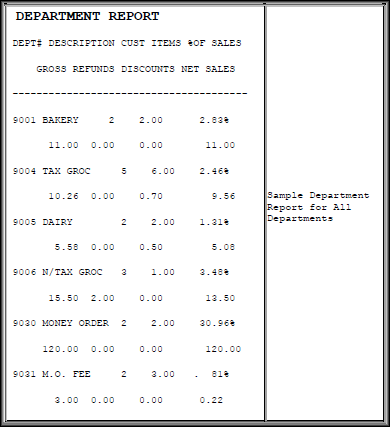
The Department Report reflects sales-related totals and counts on a department by department basis.
Report Details
DEPT#: Four-digit identification of the product as it appears in the Department File.
CUST: Number of transactions that included one or more items from this department.
ITEMS: Quantity sold of this item.
%OF SALES: Total Sales for this department divided by Total Sales (all departments).
GROSS: Total dollar amount collected for sales of a department.
REFUNDS: Total dollar amount refunded for items returned in a department.
DISCOUNTS: Total dollar amount discounted for items sold in a department. This total includes both automated and manual discount types:
Use of the [DISC], [DISC%], and [DISC AMT] keys
Combo, mix 'n match, fuel, and promotional discounts
POP discounts
NET SALES: Total dollar amount of items sold in a department after refunds and discounts have been applied.
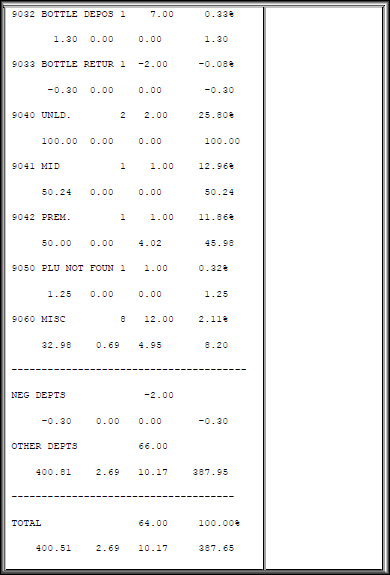
NEG DEPTS: The totals for departments marked as negative departments.
OTHER DEPTS: The totals for other department sales are not marked as negative departments (typically, most departments fall into this group).
TOTAL: Total department sales after negative department total is subtracted from other (standard) departments.