> For the complete documentation index, see [llms.txt](https://commanderhelp.verifone.com/llms.txt). Markdown versions of documentation pages are available by appending `.md` to page URLs; this page is available as [Markdown](https://commanderhelp.verifone.com/feature-references/features-and-products-references/ebt-transactions/using-ebt-transactions/considerations.md).
# Considerations
* Items that are eligible for EBT benefits should have the **Food Stamp** parameter enabled in **Store Operations > PLUs** as well as the **Allow Food Stamps** parameter enabled in **Store Operations > Merchandise > Departments**.
* EBT Cash Benefit allows purchase of non-food stamp eligible items.
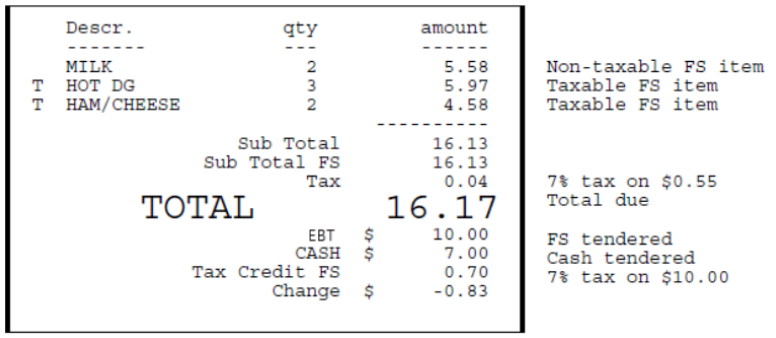
* If food stamps are tendered for less than the eligible amount and the food-stamp items are taxable, a “Tax Credit” appears on the receipt. The credit is the difference between the total tax due on the items and the tax charged on the taxable items not paid for with food stamps. For example, if an amount of $16.17 is qualified for payment with food stamps, of which 10.55 is taxable at a tax rate of 7%, then $0.74 tax is due on the $10.55. If the customer tenders $10.00 in food stamps leaving a balance of $6.17, of which $.55 is taxable. The Tax Credit is $0.70 (7% of 10.00) and the tax the customer owes is $0.04 (7% of $0.55).
{% hint style="info" %}
**EMV (chip) EBT cards:** EBT benefit cards are being upgraded to EMV (chip) on a state-by-state basis, starting with California and Oklahoma. A new EBT-specific AID has been created for these cards; it uses a Mastercard RID but is treated as a private-label application rather than a standard Mastercard product.
No new MOP setup is required -- chip EBT cards use the same EBT Food Stamp (20), EBT Cash Benefit (21), and Manual EBT CB (22) MOPs described above. Cashiers continue to press \[Credit] and let the PIN pad/EPS identify the card type exactly as today.
Because EMV EBT is rolling out ahead of full POS/processor readiness, some transactions will return an Empty Candidate List (no matching chip application on the terminal). When this happens, the terminal falls back to a magnetic-stripe swipe exactly as it does today for non-chip EBT cards.
{% endhint %}
---
# Agent Instructions
This documentation is published with GitBook. GitBook is the documentation platform designed so that both humans and AI agents can read, navigate, and reason over technical content effectively. Learn more at gitbook.com.
## Querying This Documentation
If you need additional information that is not directly available in this page, you can query the documentation by asking a question.
Perform an HTTP GET request on the following URL with the `ask` and `goal` query parameters:
```
GET https://commanderhelp.verifone.com/feature-references/features-and-products-references/ebt-transactions/using-ebt-transactions/considerations.md?ask=&goal=
```
`ask` is the immediate question: it should be specific, self-contained, and written in natural language.
`goal` is what the user is ultimately trying to achieve, the reason they need the answer. Sharing it helps GitBook give you a better, more relevant answer. A goal is most helpful when it describes the outcome the user wants rather than restating the question. For example, with `ask=how do I create an API token`, a goal like `automate deployments from our CI pipeline` lets GitBook tailor the answer to that use case.
The response will contain a direct answer to the question and relevant excerpts and sources from the documentation.
Use this mechanism when the answer is not explicitly present in the current page, you need clarification or additional context, or you want to retrieve related documentation sections.