> For the complete documentation index, see [llms.txt](https://commanderhelp.verifone.com/llms.txt). Markdown versions of documentation pages are available by appending `.md` to page URLs; this page is available as [Markdown](https://commanderhelp.verifone.com/feature-references/features-and-products-references/electronic-safe/reporting-electronic-safe/pos-flash-reports/e-safe-content-report.md).
# E-Safe Content Report
{% hint style="info" %}
See POS Flash Report procedure under E-Safe End of Day Report to run an E-Safe Content Report.
{% endhint %}
The Content Report displays the total amount of funds existing in the E-Safe vault, courier trays and bill acceptors. The report is generated at the E-Safe.
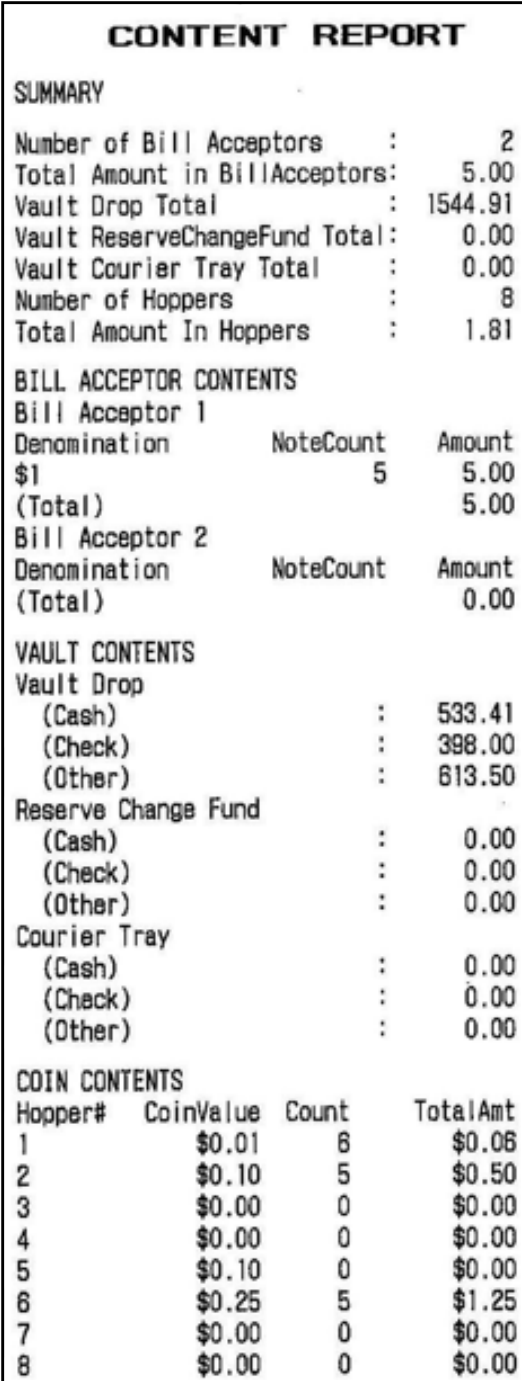 *The POS System communicates with E-Safe to retrieve the safe's financial data and prints the data and totals from E-Safe's Content Report on the POS End of Day report.*
**Report Details**
* TITLE: CONTENT REPORT
* Number of Bill Acceptors: The quantity of bill acceptors servicing that E-Safe.
* Total Amount in Bill Acceptors: Sum total of all bills collected for the reporting period with the bill acceptors.
* Vault Drop Total: Sum total of funds collected during vault drop operations.
* Vault ReserveChangeFund Total: The change reserve kept in the vault.
* Vault Courier Tray Total: Vault container for the courier.
* Number of Hoppers: Number of containers inside E-Safe that dispense its contents (coins or bills) at the bottom.
* Total Amount In Hoppers: Sum total of all hoppers.
* Denomination: A specific note value inserted.
* NoteCount: The quantity of the a specific note value that was inserted.
* Amount: Sum total of that specific denomination.
* Total: Sum total of all denominations reported.
* Denomination: A specific note value inserted.
* NoteCount: The quantity of the a specific note value that was inserted.
* Amount: Sum total of that specific denomination.
* Total: Sum total of all denominations reported.
* Vault Drop: The note type content of drops.
* Cash: paper currency.
* Check: Note drawn against deposited funds.
* Other: Paper coupons or other vault drop items.
* Cash: Coins and paper currency.
* Check: Note drawn against deposited funds.
* Other: Paper coupons or other vault drop items.
* Cash: Coins and paper currency.
* Check: Note drawn against deposited funds.
* Other: Paper coupons or other vault drop items.
* Hopper#: Identifies the Hopper with the coin distribution.
* CoinValue: Denomination of the coins being held in the hopper identified.
* Count: Quantity of the coins being held in the hopper identified.
* Total Amt: Sum total of the coins being held in the identified hopper.
---
# Agent Instructions
This documentation is published with GitBook. GitBook is the documentation platform designed so that both humans and AI agents can read, navigate, and reason over technical content effectively. Learn more at gitbook.com.
## Querying This Documentation
If you need additional information that is not directly available in this page, you can query the documentation by asking a question.
Perform an HTTP GET request on the following URL with the `ask` and `goal` query parameters:
```
GET https://commanderhelp.verifone.com/feature-references/features-and-products-references/electronic-safe/reporting-electronic-safe/pos-flash-reports/e-safe-content-report.md?ask=&goal=
```
`ask` is the immediate question: it should be specific, self-contained, and written in natural language.
`goal` is what the user is ultimately trying to achieve, the reason they need the answer. Sharing it helps GitBook give you a better, more relevant answer. A goal is most helpful when it describes the outcome the user wants rather than restating the question. For example, with `ask=how do I create an API token`, a goal like `automate deployments from our CI pipeline` lets GitBook tailor the answer to that use case.
The response will contain a direct answer to the question and relevant excerpts and sources from the documentation.
Use this mechanism when the answer is not explicitly present in the current page, you need clarification or additional context, or you want to retrieve related documentation sections.