

Reporting Mudflap Support
Mudflap uses the same standard set of terminal-side fleet reports as the other commercial fleet providers:
Terminal Day Summary -- day-level totals for Mudflap activity (intended primarily for back-office use).
Detail -- transaction-level detail (intended primarily for back-office use).
Day Exception Details -- transactions that could not be finalized with Mudflap, with the failure result, amount, trace number (STAN), and account number, plus exception totals. This is the report to check when a completion could not reach Mudflap.
To print the Exception report at the point of sale:
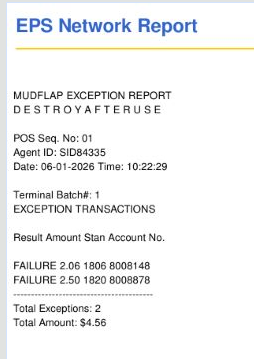
Sample Mudflap Exception report.