

M425A - Payment Terminal
The Verifone M425A is a new Multi-Lane, media-capable and consumer-facing PIN pad.
Using This Feature Reference
This Feature Reference provides detailed information on how to install, configure and use the M425A - Payment Terminal.
This feature reference includes the following sections:
Overview - This section contains a description of the M425A device, its features and benefits.
Configuring - This section contains information on how to install and configure the M425A - Payment Terminal.
Using - This section describes the day-to-day operation of the M425A - Payment Terminal and answers frequently asked questions.
Troubleshooting - This section contains troubleshooting guidelines and Verifone service and support information.
Device Overview
The Verifone M425A is a new Multi-Lane, media-capable and consumer-facing device. M425A device's enriching features allow electronic payment transactions to be processed in multi-lane scenarios with combined card payment with a variety of Verifone cloud-based services including Advanced Payment Methods, e-comm capabilities such as Buy Online Pick-Up in Store, and the ability to dynamically configure multi-media driven promotional content at the counter.
This payment processing device can scan barcodes, QR codes, and products with the help of an integrated camera. In combination with Verifone Connect digital services, it offers the ability to run Android applications, like loyalty and inventory. It also enables clients to remotely monitor and update their devices using Verifone's estate management solution.
The best-in-class M425A device will be able to communicate to the ECR via serial over USB and IP over USB simultaneously and support multiple SAM cards for transaction processing. Verbal Message Supporter is a new significant feature where the user will be able to speak into the terminal microphone to state their issue or raise a question that will be received by the Verifone Support Administrator. It also supports video playback from a serial digital memory interface to play training videos for staff and promotional content to customers at or near the checkout counter or in the lane. It transforms the customer's journey into a simple walk-through by providing different connection options like an external power supply, USB, and Ethernet.
M425A Device
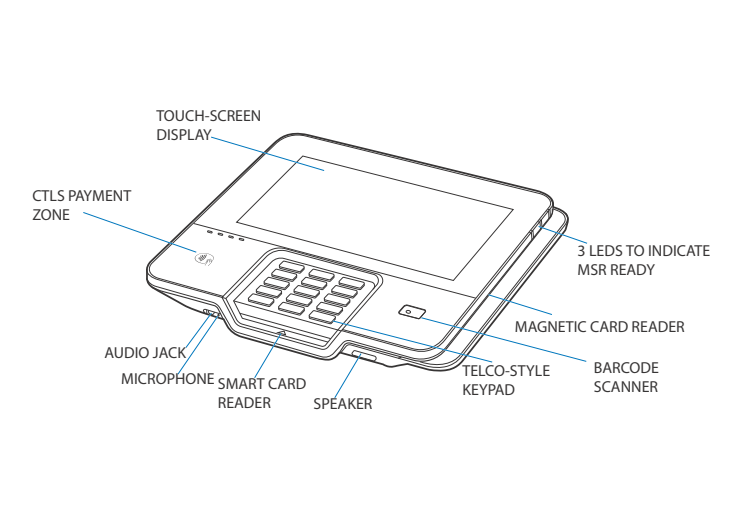
This document explains what is changing, what the new terminals can do, how they look and feel compared to what you have today, and how software updates are managed going forward. It is written for site operators, managers, and anyone who works with or beside these terminals -- not for technical or IT staff.
Why Is Verifone Upgrading the Terminals?
The terminals used at many fuel sites today -- the MX915, MX925, and M400 -- are reaching the end of their supported life. The MX900-series devices reach end of service in 2026, and the M400 devices reach their payment card security expiry (PCI) in April 2026. Once a terminal passes its PCI expiry, it can no longer legally process card payments.
The M425A is built on Android and certified to the latest payment security standards (PCI PTS 6 and 7), which will remain valid for many years ahead. Moving to these devices now ensures sites can continue processing card payments without interruption.
MX915 / MX925
M400
M450A / M425A
VOS platform (older OS)
VOS2 platform (older OS)
Android 13 -- modern, fast, secure
ViperPay application
EVPay application
EVPay on Android (VIPA 7)
End of service: 2026
PCI expiry: April 2026
PCI 6/7 -- valid for years ahead
No contactless on some models
Limited card format support
Full contactless, chip, swipe, fleet, debit PIN
Terminal at a Glance
The M425A is a high-performance, multi-lane payment terminal designed for retail and countertop use. Here is what you will find on the device:
Screen
5.5-inch full-colour touchscreen -- bright, responsive, and easy to read indoors and outdoors.
Keypad
Backlit tactile keypad for PIN entry -- physical keys with a backlight so customers can see them clearly in any lighting.
Operating system
Verifone Secure OS (VAOS) -- a secure, customised version of Android 13 built specifically for payment terminals.
Payment acceptance
Chip card (EMV), tap-to-pay / contactless (NFC), magnetic stripe swipe -- all supported out of the box.
Digital wallets
Apple Pay, Google Pay, Samsung Pay, and other NFC-based digital wallets all work with the tap-to-pay reader.
Connectivity
Dual-band Wi-Fi (2.4 GHz and 5 GHz), Bluetooth, and Ethernet -- the terminal can connect to your site network via cable or wirelessly.
Code scanning
Built-in scanner reads QR codes, barcodes, and PCR codes -- used for digital coupons, loyalty programme apps, and scanning items directly from a customer's phone.
Security
PCI PTS 6.x / 7.x certified. End-to-end encryption and P2PE-ready. Tamper-evident design -- if the device is physically tampered with, it disables itself.
Payment application
EVPay running on VIPA 7 -- the same EVPay application used across the Verifone petroleum terminal fleet, now running on Android.
Software installed?
Yes -- EVPay software comes pre-installed from the factory. A setup visit is still required to configure network, sponsor certificate, and encryption keys.
What Is New with the M425A
🔄 Automatic Updates EVPay software updates are pushed automatically via VHQ (cloud) or from Commander on-site -- no technician visit needed for routine updates.
📷 QR & Barcode Scanner Customers can scan digital coupons, loyalty app barcodes, and QR codes directly from their phone screen -- no paper required.
🛒 Customer Engagement Display custom splash screens, on-screen tipping prompts, loyalty recognition, and online specials directly on the terminal screen.
The Refreshed Payment Screen (EVPay UI)
The payment screen on the M425A has been completely redesigned based on direct feedback from cashiers and customers at fuel sites. The goal was to make it cleaner, easier to read at a glance, and less prone to accidental taps.
Button size and layout
Buttons stretched the full width of the screen. Customers found them hard to read and easy to tap accidentally.
Buttons are a more natural size -- easy to see and tap precisely, whether you have small or large hands.
Font size
Text on the PIN pad and payment prompts was small and difficult to read, especially in bright outdoor light.
Larger, clearer fonts throughout the payment flow -- easier to read for all customers.
Contactless icon placement
The contactless (tap) icon was placed where cards sometimes triggered it accidentally.
The contactless area is repositioned and clearly marked to reduce accidental triggers.
Scroll bars
Narrow scroll bars were difficult to grab and drag on a touchscreen.
Wider, more touch-friendly scroll bars -- and layouts are redesigned to minimise scrolling altogether.
Number of choices on screen
Limited options were visible at once, requiring multiple screen taps to complete a simple selection.
More choices visible at once, reducing the number of screens a customer taps through.
Customer Engagement Features
The M425A is not just a payment device. Its vibrant 5.5-inch touchscreen can be used to create richer checkout experiences for your customers -- without any extra hardware.
Custom splash screens
Display your brand, promotions, or site-specific messages on the terminal screen when it is idle. Customers see your content while waiting to pay, not just a blank screen.
On-screen tipping
For sites that offer tipping (car washes, food service, etc.), tip prompts can be shown directly on the terminal screen. Customers select a tip amount before confirming payment -- no separate tip slip needed.
Loyalty programme recognition
The terminal can recognise returning loyalty customers and display personalised prompts -- for example, showing a customer their current points balance or a targeted reward offer as they pay.
Online specials and promotions
Promotional offers and digital specials can be displayed on the terminal at the point of payment -- encouraging add-on purchases or informing customers of current deals.
QR code & barcode scanning
Customers can scan digital coupons, loyalty barcodes, or QR codes directly from their smartphone screen. The terminal reads the code instantly -- no paper coupon needed.
Self-checkout support
The M425A can be used in a self-checkout configuration, giving customers the option to complete their own purchases during busy periods -- reducing queue time without additional staffing.
Alternative payment methods (APMs)
In addition to card payments, the terminal is designed to accept alternative payment methods -- such as digital wallets and any payment type configured by your Verifone deployment team.
Electronic document signing
Where required (for example, fuel delivery agreements or rental authorisations), customers can sign electronically on the terminal touchscreen -- no separate signature pad needed.
Payment Types Accepted
Chip card (EMV)
Insert the card into the chip slot at the bottom of the terminal and follow on-screen prompts.
All major networks -- Visa, Mastercard, Amex, Discover.
Tap to pay (contactless / NFC)
Hold the card, phone, or watch near the contactless symbol. No PIN needed for most tap transactions.
Works with contactless cards, Apple Pay, Google Pay, Samsung Pay, and all NFC-enabled devices.
Magnetic stripe (swipe)
Swipe the card through the card reader slot on the side of the terminal.
Fallback if the chip cannot be read. All card types supported.
Fleet cards
Insert or swipe the fleet card. Extra prompts (odometer, driver ID, etc.) may appear depending on the fleet programme.
Fleet prompts are controlled by Commander, not the terminal itself.
Debit with PIN
Insert or swipe the debit card. The customer enters their PIN on the physical keypad.
Fully supported. The keypad design shields the PIN from nearby view.
PIN bypass (signature debit)
Debit card used without PIN -- processed as a signature transaction.
Available where permitted by the payment network and site setup.
Digital wallets (Apple Pay, Google Pay, etc.)
Customer holds their phone or watch near the contactless reader.
All NFC-enabled digital wallets are supported.
QR / barcode loyalty or coupon
Customer opens loyalty app or coupon on their phone -- terminal scans the code directly from the screen.
No paper required. Works with most loyalty app barcodes and digital coupons.
Key Features
Processor
• Quad-core ARM Cortex-A53 64-bit CPU @ 1.3 GHz • Dedicated secure processor
Memory
• 2 GB LPDDR3 + 16 GB eMMC • Secure processor: 8Mb SPI Flash
Display
• 5.5-inch (120.77 X 67.93) HD IPS LCD, Capacitive Touch screen
Keypad (touch)
• Dedicated mechanical keypad and on-screen (touch) keypad.
Payment
• Magnetic Swipe Reader (MSR) • Smart Card Reader (SCR) • Contactless Reader (CTLS) • Near Field Communication (NFC) • Quick Response (QR) code
Communication
• Bluetooth 4.2 BLE • 2.4 GHz + 5GHz Wi-Fi, 802.11 a, b, g, n, ac
Peripheral Ports
• Custom Multiport Interface
Camera
• 5 MP (front QR/Barcode Scanner) • Auto-focus • Fast scanner
Security
• PCI PTS 6.X • SRED • Supports AES DUKPT
SAM
• 3 Standard SAM
uSD
• SD 3.0, supports 4-bit SD mode
Environmental
• Operating temperature: -10° to 50°C (14° to 122°F) • Storage temperature: -20° to 60°C (-4° to 140°F) • Relative humidity: 5% to 90% non-condensing
Benefits
Following are the features and benefits of the M425A device.
Ease of Use
5.5″ LCD for unlimited application possibilities and easy readability under various lighting conditions.
Touchscreen for icon-based applications or electronic signature capture support.
Intuitive telco-style keypad with colored control keys.
Bi-directional magnetic stripe card reader with an extended blade for optimal card reading.
Audio jack to facilitate accessibility for the visually impaired.
Performance and Durability
Fast transactions due to powerful Quad-core ARM Cortex-A53 64-bit CPU @ 1.3 GHz.
16 GB of eMMC and 2 GB LPDDR3.
Rounded corners and drop resistant to less than 75cm on a concrete floor to minimize breakage.
IP53 rating when terminal is mouted on Stands.
Security
Supports tamper-sensing circuitry to detect unauthorized intrusion and a broad spectrum of software-based security features.
PCI-PTS 6.X for debit and other PIN-based transactions.
EMV Level 1 Type.
Supports reliable security features including TLS, VeriShield file authentication, and VeriShield Protect to help prevent fraud and other intrusions.
Contactless Capability
Advanced contactless architecture that future-proofs investment with a single contactless interface (SingleCl), SoftSAMs, and side-by-side application architecture.
Dedicated tap zone for optimized user experience.
Accepts EMV, NFC, QR Code, and mag-stripe contactless payments as well as PIN-based transactions.
Communication Technology
Bluetooth: Simple, plug-and-play for locations that need short-range wireless capability. Eddystone and iBeacon profiles are also supported.
Wi-Fi: supports multiple wireless devices and supports an existing IP infrastructure.
Connectivity
USB-C Port
How the Terminal Stays Up to Date
Unlike older terminals that required a technician visit or manual USB update to change the software, the M425A can receive software updates remotely -- either through Verifone's cloud management system or directly from Commander on-site.
Via VHQ (Verifone HeadQuarters) -- Cloud Updates
VHQ is Verifone's cloud-based device management platform. When a new version of EVPay or a configuration update is approved and ready, VHQ automatically pushes it to the terminal during a scheduled maintenance window -- typically overnight, outside of trading hours.
Updates are applied automatically -- no action needed from the site operator or cashier.
The terminal waits until it is idle (no payment in progress) before applying the update.
After the update, the terminal restarts and returns to the payment screen ready for use.
All terminals at a site can be managed and updated centrally without visiting each one individually.
Via Verifone Commander (On-Site, On-Demand)
For sites that want to check or update the terminal software on-site, Verifone Commander can also manage EVPay updates directly -- without needing cloud access or a VHQ workflow.
From Commander's configuration screen, an operator can see which EVPay version is currently running on any connected M425A.
If a newer approved version is available, an update can be triggered directly from Commander -- no technician visit required.
The update does not interrupt an active payment transaction.
Quick Reference Summary
What it is
M425A -- next-generation Android payment terminal running EVPay on VIPA 7.
Screen
5.5-inch colour touchscreen. Backlit tactile keypad for PIN entry.
Connectivity
Dual-band Wi-Fi, Bluetooth, and Ethernet -- connects to your site network via cable or wirelessly.
Why upgrading
MX900 and M425A reach end-of-service / PCI expiry in 2026. M425A is PCI 6/7 compliant -- valid for years ahead.
Payment types
Chip (EMV), tap/NFC (contactless), swipe, fleet, debit PIN, PIN bypass, Apple Pay, Google Pay.
QR/barcode scanning
Reads digital coupons, loyalty barcodes, and QR codes from a customer's phone screen. Built-in scanner.
Customer engagement
Splash screens, on-screen tipping, loyalty recognition, promotions -- configurable by your Verifone team.
New payment screen
Redesigned UI -- larger text, better buttons, reduced accidental taps, wider scroll bars. Payment steps unchanged.
Software installed?
Yes -- pre-installed from factory. Site setup (network, keys, certificates) still required at installation.
Software updates
Automatic via VHQ (cloud, overnight). Also on-demand from Commander on-site. No technician visit for routine updates.
Commander config
Same as previous Verifone pinpads -- no Commander reconfiguration required.
Tamper protection
Tamper-evident hardware. No user-serviceable parts. Do not open or disassemble.
Available from
Base 057.01.00 (EVPay on Android M425A, UI refresh, VHQ updates).
Support
Contact your Verifone support line. Have the terminal serial number (back label) and any error message ready.
Last updated