> For the complete documentation index, see [llms.txt](https://commanderhelp.verifone.com/llms.txt). Markdown versions of documentation pages are available by appending `.md` to page URLs; this page is available as [Markdown](https://commanderhelp.verifone.com/feature-references/features-and-products-references/release-53-and-higher-ui-reference/user-interface-changes/changes-in-current-pos-ui-vs-new-ui.md).

# Changes in Current POS UI vs New UI

## Audio, Brightness & Screensaver Controls

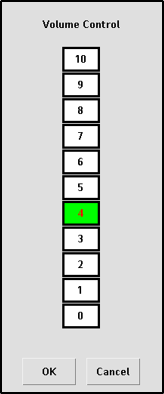
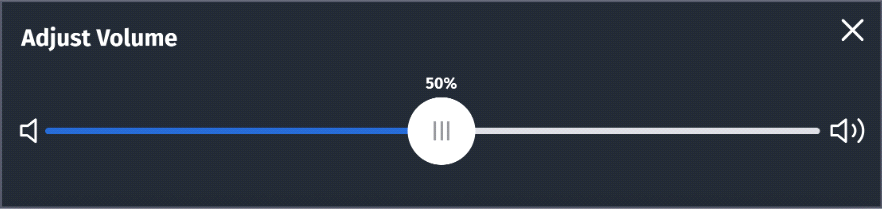
## Audio

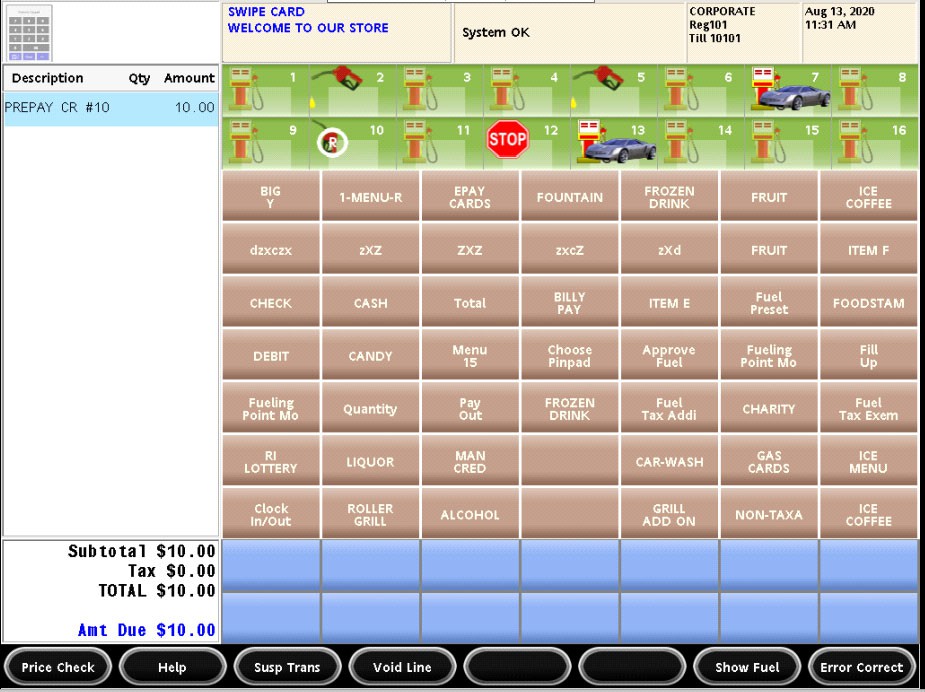
**Current POS UI**<br>

<figure><img src="https://content.gitbook.com/content/5nJgnNKJ9ZrZeEdr7pqh/blobs/86XlFK5HJfJz0OjALLrd/images/image17.png" alt=""><figcaption></figcaption></figure>

**New UI**<br>

<figure><img src="https://content.gitbook.com/content/5nJgnNKJ9ZrZeEdr7pqh/blobs/HrcAWBrgjbiCU11iruk3/images/image18.png" alt="" width="563"><figcaption></figcaption></figure>

*The volume is audible when slider is moved and finger is lifted on audio control, The settings are saved when widget is closed.*

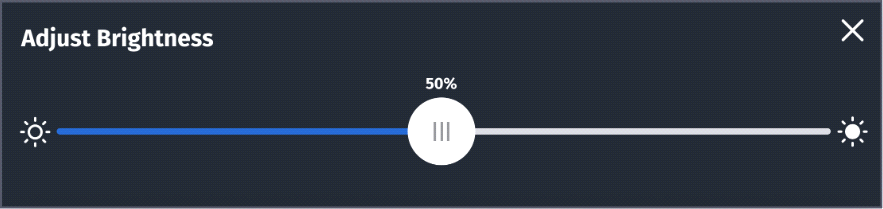
## Brightness

![](https://content.gitbook.com/content/5nJgnNKJ9ZrZeEdr7pqh/blobs/UhuYkzieex5MBw77A81f/images/image19.png)

**Current POS UI**\
**New UI**\
The brightness is visible when slider is moved and finger is lifted from brightness control. The settings are saved when widget is closed.<br>

<figure><img src="https://content.gitbook.com/content/5nJgnNKJ9ZrZeEdr7pqh/blobs/mWNxpbnHggSdiP1CAfPR/images/image20.png" alt="" width="375"><figcaption></figcaption></figure>

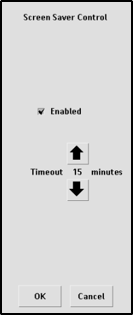
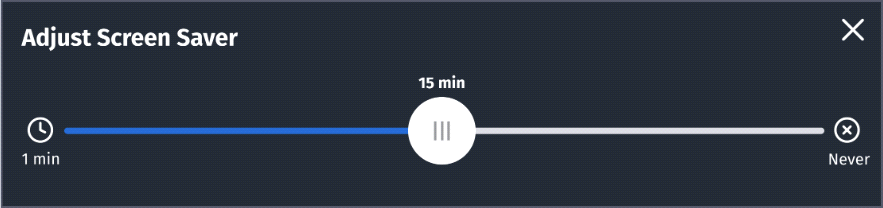
## Screensaver

**Current POS UI**<br>

<figure><img src="https://content.gitbook.com/content/5nJgnNKJ9ZrZeEdr7pqh/blobs/LMkwjXKCyT2vfvSL2TyV/images/image21.png" alt=""><figcaption></figcaption></figure>

**New UI**\
The settings are saved when widget is closed. I<br>

<figure><img src="https://content.gitbook.com/content/5nJgnNKJ9ZrZeEdr7pqh/blobs/CUpgRWdU47t16CuJ1WOt/images/image22.png" alt="" width="563"><figcaption></figcaption></figure>

## Calculator Widget

**Current POS UI**

<img src="https://content.gitbook.com/content/5nJgnNKJ9ZrZeEdr7pqh/blobs/NktnIFXh3raHKBbPdtjj/images/image23.png" alt="" width="563">

**New UI**<br>

<figure><img src="https://content.gitbook.com/content/5nJgnNKJ9ZrZeEdr7pqh/blobs/evPwlu8CeqUf1QYiGRgn/images/image24.png" alt="" width="375"><figcaption></figcaption></figure>

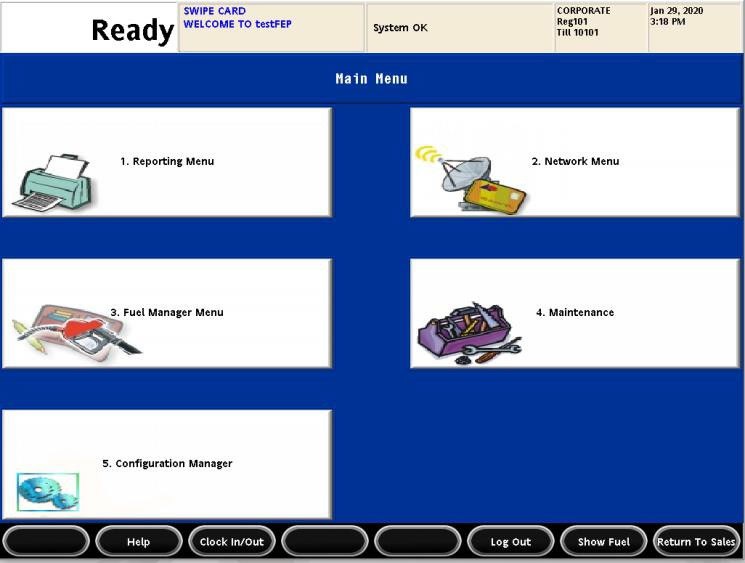
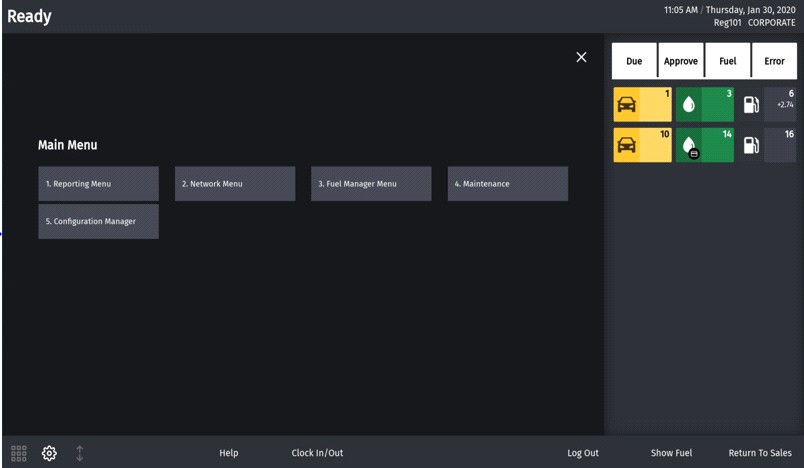
## Cashier Functions Menu

**Current POS UI**<br>

<figure><img src="https://content.gitbook.com/content/5nJgnNKJ9ZrZeEdr7pqh/blobs/NKpevSm10Jse7lFKIrJm/images/image25.jpeg" alt=""><figcaption></figcaption></figure>

**New UI**<br>

<figure><img src="https://content.gitbook.com/content/5nJgnNKJ9ZrZeEdr7pqh/blobs/L7Ou8Jjl9ZlKlbwcioKZ/images/image26.jpeg" alt=""><figcaption></figcaption></figure>

## Daily Message Area

The daily message area is found on top of the POS screen.<br>

<figure><img src="https://content.gitbook.com/content/5nJgnNKJ9ZrZeEdr7pqh/blobs/NaGCM8B76AbaHL0FzE0t/images/image27.png" alt=""><figcaption></figcaption></figure>

**Current POS UI**\
**New UI**\
The text color of daily message copy is black/white depending on the theme selected. The PIN pad messages are not shown in blue color anymore.<br>

<figure><img src="https://content.gitbook.com/content/5nJgnNKJ9ZrZeEdr7pqh/blobs/v7i3XKl3inN0MBmudRzl/images/image28.png" alt=""><figcaption></figcaption></figure>

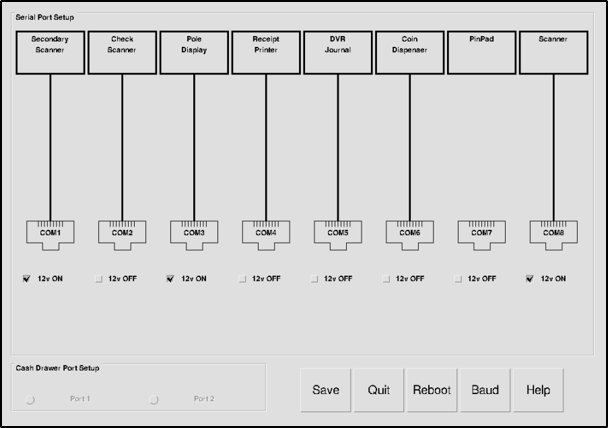
## Device Control

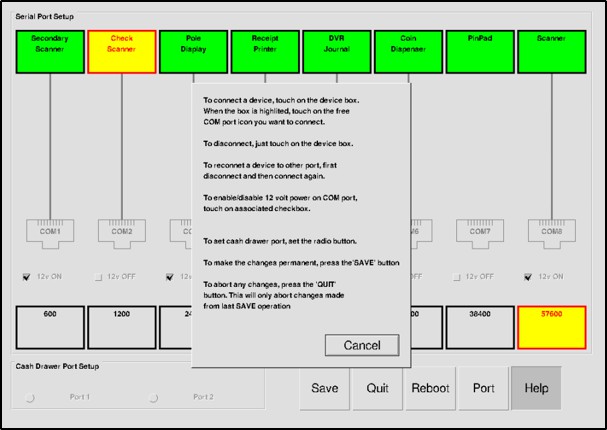
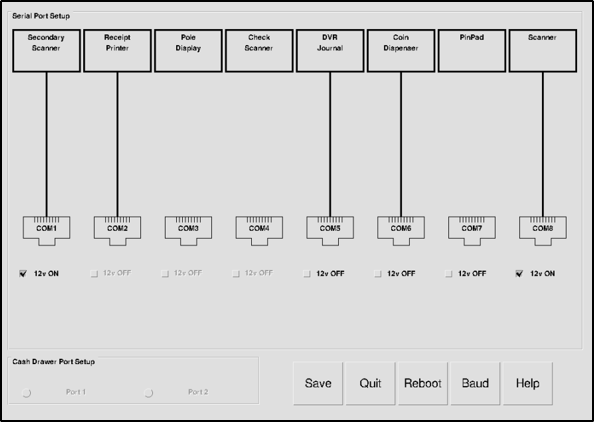
Access Device Control from CSR Functions > Maintenance. Current POS UI<br>

<figure><img src="https://content.gitbook.com/content/5nJgnNKJ9ZrZeEdr7pqh/blobs/4Gr4NtbAvqFR8IYTiaEn/images/image29.png" alt=""><figcaption></figcaption></figure>

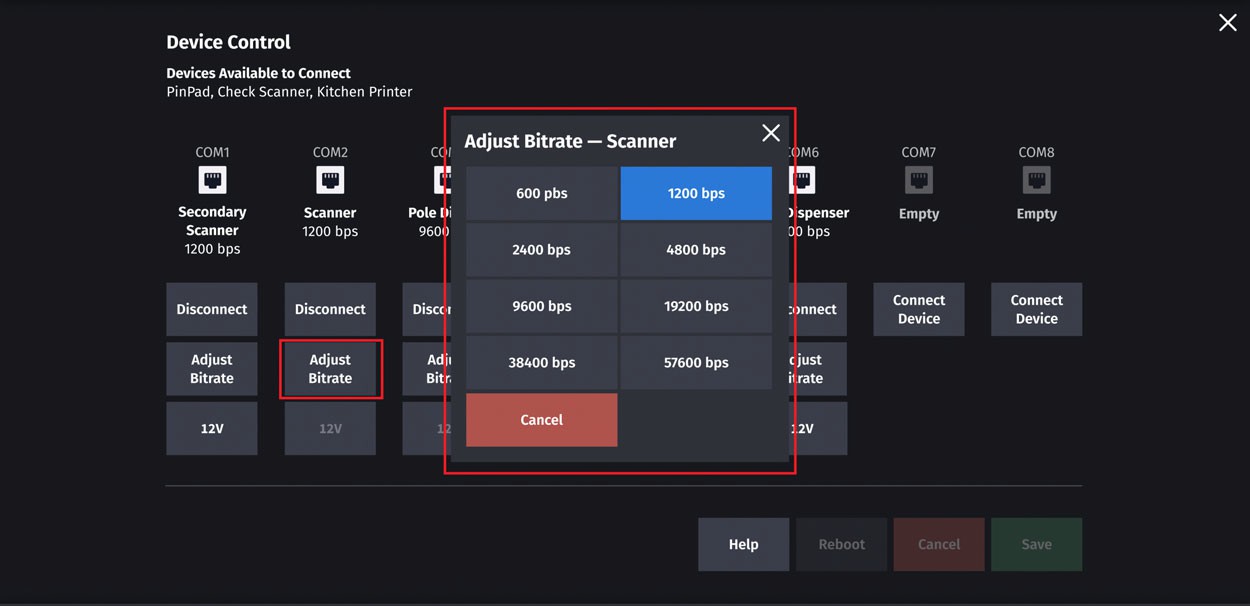
**New UI**

The following are the changes made to Device Control:

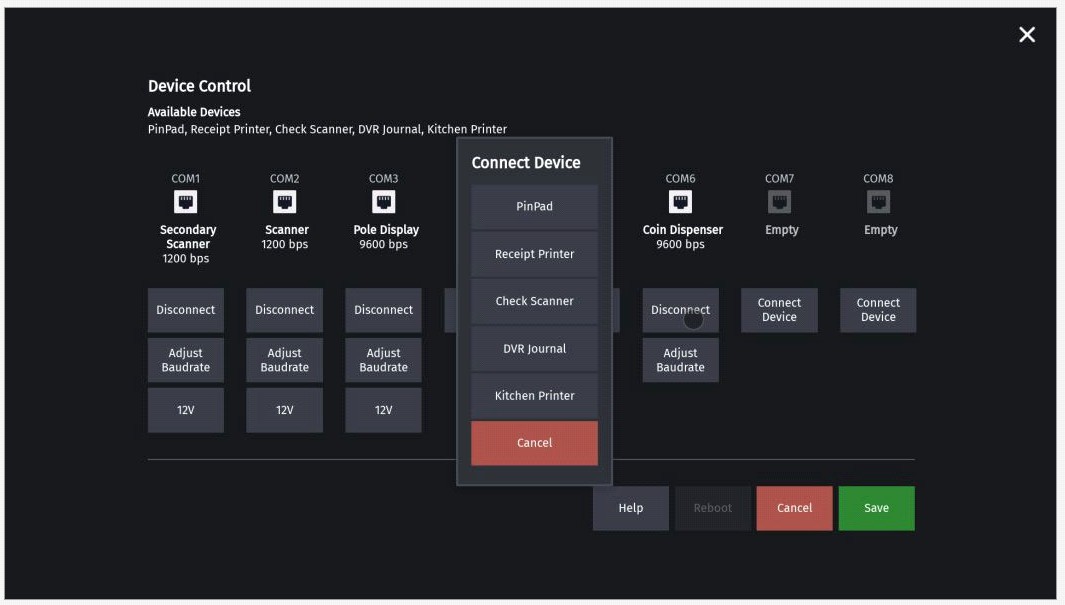
* The background is dimmed for pop-ups for baud-rate selection, help message and con-necting device. The UI elements underneath the pop-up is not accessible. The serial icon for disconnected devices are grayed out.
* The 12V button is like a ON/OFF switch. If its OFF then button is grayed out.
* Only `Help` button is active when widget is accessed and all other buttons (Reboot, Cancel, Save) are grayed out. The `Help` remains active till widget is dismissed.
* Whenever there is some change, other buttons become active.
  * On clicking Cancel, all buttons are grayed out except Help.
  * On clicking Save, all changes are saved. All buttons are grayed out except Help and Reboot.
* When the widget is dismissed, all pending changes are saved.

![](https://content.gitbook.com/content/5nJgnNKJ9ZrZeEdr7pqh/blobs/Iihu6zES2PMkQEGwy3EA/images/image30.jpeg)

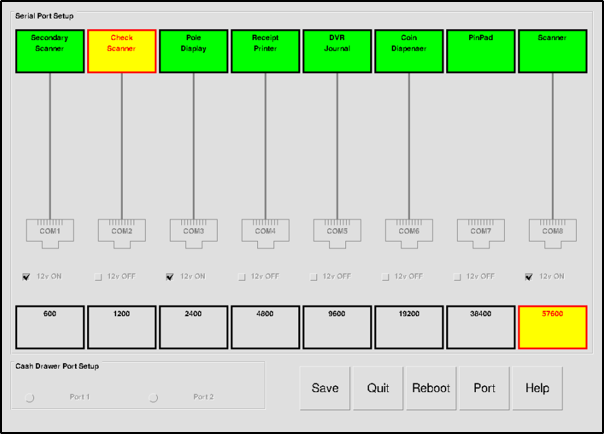
**Device Control - Baud rate**

**Current POS UI**<br>

<figure><img src="https://content.gitbook.com/content/5nJgnNKJ9ZrZeEdr7pqh/blobs/Ipr8ocADsDIyB9VPStKY/images/image31.png" alt=""><figcaption></figcaption></figure>

**New UI**<br>

<figure><img src="https://content.gitbook.com/content/5nJgnNKJ9ZrZeEdr7pqh/blobs/u6AHFDcSaLJcJCuIMgY5/images/image32.jpeg" alt=""><figcaption></figcaption></figure>

**Device Control - Help**

**Current POS UI**<br>

<figure><img src="https://content.gitbook.com/content/5nJgnNKJ9ZrZeEdr7pqh/blobs/Bx3RjFU5piSzRjGwTXvF/images/image33.jpeg" alt=""><figcaption></figcaption></figure>

**New UI**

![](https://content.gitbook.com/content/5nJgnNKJ9ZrZeEdr7pqh/blobs/EGQPll699Qr2qz6GH742/images/image34.png)

**Device Control - Connect Device**

**Current POS UI**<br>

<figure><img src="https://content.gitbook.com/content/5nJgnNKJ9ZrZeEdr7pqh/blobs/WcfljvR0mizcHd7ZqG4I/images/image35.png" alt=""><figcaption></figcaption></figure>

**New UI**<br>

<figure><img src="https://content.gitbook.com/content/5nJgnNKJ9ZrZeEdr7pqh/blobs/pPZOftbpFadj723GZTOx/images/image36.jpeg" alt=""><figcaption></figcaption></figure>

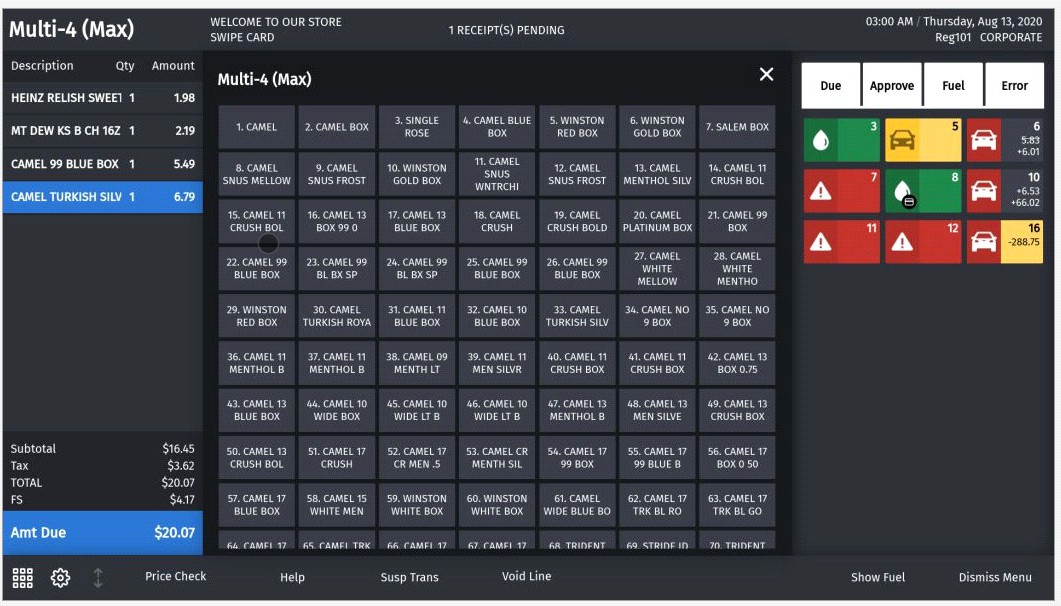
## Expanded Menu

**Current POS UI**

![](https://content.gitbook.com/content/5nJgnNKJ9ZrZeEdr7pqh/blobs/7rtV8SF1vQyHqfPy9iY1/images/image37.jpeg)

\
**New UI**<br>

<figure><img src="https://content.gitbook.com/content/5nJgnNKJ9ZrZeEdr7pqh/blobs/teY9oDYIBS3qaFqgZPx3/images/image38.jpeg" alt=""><figcaption></figcaption></figure>

*If there are more menu buttons than available widget area then partial button row on top and bottom is shown. The hidden buttons can be accessed by scrolling.*

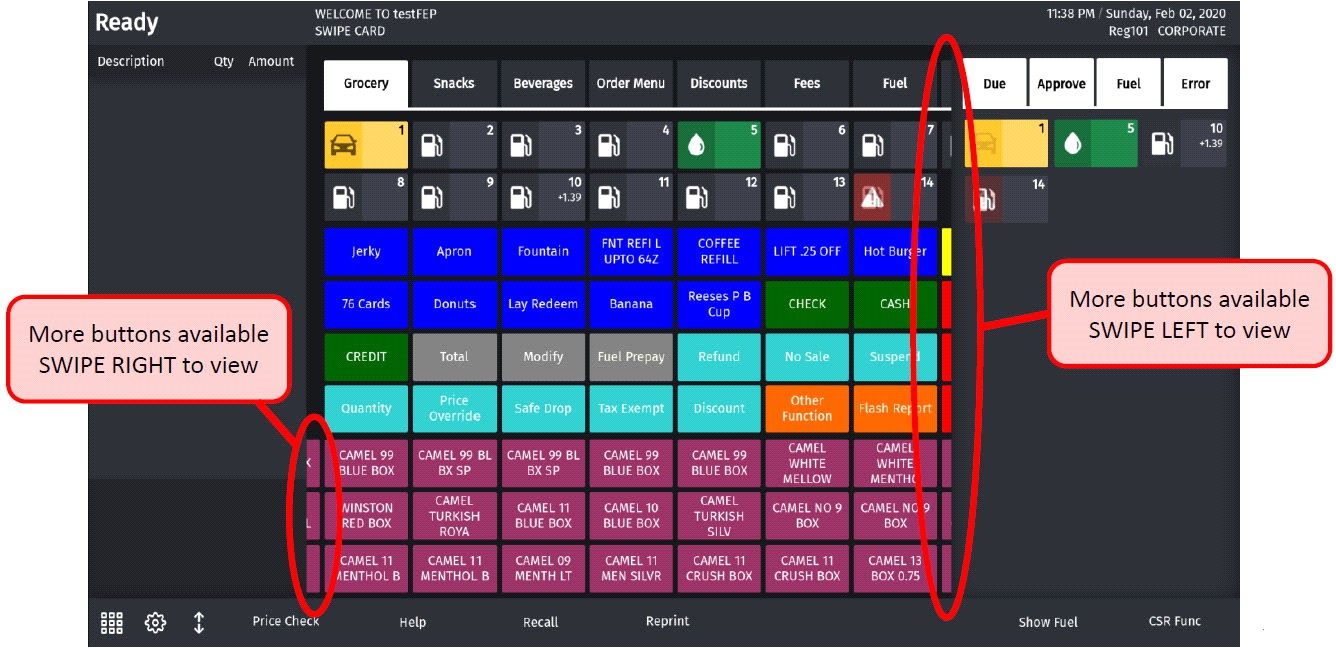
## Sales Screen

If there are more menu buttons than available widget area then partial button row on left and right is shown. The hidden buttons can be accessed by scrolling.

**Current POS UI**<br>

<figure><img src="https://content.gitbook.com/content/5nJgnNKJ9ZrZeEdr7pqh/blobs/WmfvNiB2KvxHISZ9NcZ4/images/image39.jpeg" alt=""><figcaption></figcaption></figure>

**New UI**<br>

<figure><img src="https://content.gitbook.com/content/5nJgnNKJ9ZrZeEdr7pqh/blobs/2K9b9FwGC8FRRINeqCth/images/image40.jpeg" alt=""><figcaption></figcaption></figure>

## Express Panel

The express panel is located at the bottom of the POS.

**Current POS UI**<br>

<figure><img src="https://content.gitbook.com/content/5nJgnNKJ9ZrZeEdr7pqh/blobs/gq4qiRUMqhK7WrVBPh20/images/image41.png" alt=""><figcaption></figcaption></figure>

**New UI**\
Icons for numeric keypad, settings, and item panel resize are on the left side. The back-ground color of buttons match with theme and the buttons look like labels.<br>

<figure><img src="https://content.gitbook.com/content/5nJgnNKJ9ZrZeEdr7pqh/blobs/hPuj3zeTcW0mCdNOHUcp/images/image42.png" alt=""><figcaption></figcaption></figure>

## Fuel Buttons

In the current POS UI, the icons on the buttons for stop pump, help requested, calling pump and drive-off blink. The amounts with + sign are for customers owing money and amounts with - sign are for money owed to customer.

| Fuel States       | Current POS UI                                                                                                                                                                                                                                            | New UI                                                                                                                                                                                                                                                    |
| ----------------- | --------------------------------------------------------------------------------------------------------------------------------------------------------------------------------------------------------------------------------------------------------- | --------------------------------------------------------------------------------------------------------------------------------------------------------------------------------------------------------------------------------------------------------- |
| OFFLINE           | <img src="https://1800087076-files.gitbook.io/~/files/v0/b/gitbook-x-prod.appspot.com/o/spaces%2F5nJgnNKJ9ZrZeEdr7pqh%2Fuploads%2F555gAz3RupgYoiRtuz1M%2Fimage.png?alt=media&amp;token=b88fe802-5db0-43b8-9dc4-c9d1e8fc51a4" alt="" data-size="original"> | <img src="https://1800087076-files.gitbook.io/~/files/v0/b/gitbook-x-prod.appspot.com/o/spaces%2F5nJgnNKJ9ZrZeEdr7pqh%2Fuploads%2FI2n3pdut3WNe4gcIlQry%2Fimage.png?alt=media&amp;token=96352f14-a70f-44d3-ad9e-5eef01f4c31f" alt="" data-size="original"> |
| UNASSIGNED        | <img src="https://1800087076-files.gitbook.io/~/files/v0/b/gitbook-x-prod.appspot.com/o/spaces%2F5nJgnNKJ9ZrZeEdr7pqh%2Fuploads%2F2I2XLJAosRaUVXi99QVS%2Fimage.png?alt=media&amp;token=31a96cea-72c1-47c8-91e5-4645746e9d40" alt="" data-size="original"> | <img src="https://1800087076-files.gitbook.io/~/files/v0/b/gitbook-x-prod.appspot.com/o/spaces%2F5nJgnNKJ9ZrZeEdr7pqh%2Fuploads%2F0tCGAy3RRRPqAvQp4IFg%2Fimage.png?alt=media&amp;token=5436e710-062b-4cd6-a105-9226f0d6e200" alt="" data-size="original"> |
| IDLE              | <img src="https://1800087076-files.gitbook.io/~/files/v0/b/gitbook-x-prod.appspot.com/o/spaces%2F5nJgnNKJ9ZrZeEdr7pqh%2Fuploads%2FVKQcbeG4P9kHfBv5MhIJ%2Fimage.png?alt=media&amp;token=0b885d9a-ce3f-41a8-983a-ec0407a79939" alt="" data-size="original"> | <img src="https://1800087076-files.gitbook.io/~/files/v0/b/gitbook-x-prod.appspot.com/o/spaces%2F5nJgnNKJ9ZrZeEdr7pqh%2Fuploads%2FSfVF4FYd6RCr59v6ZjJi%2Fimage.png?alt=media&amp;token=43f50bb3-03e7-4fa2-8903-d72631d0a5de" alt="" data-size="original"> |
| PUMP CALLING      | <img src="https://1800087076-files.gitbook.io/~/files/v0/b/gitbook-x-prod.appspot.com/o/spaces%2F5nJgnNKJ9ZrZeEdr7pqh%2Fuploads%2FIbQ2xJtLqANlyM1VrxSn%2Fimage.png?alt=media&amp;token=24f2de4f-1122-4cc7-b673-7916f6f060bd" alt="" data-size="original"> | <img src="https://1800087076-files.gitbook.io/~/files/v0/b/gitbook-x-prod.appspot.com/o/spaces%2F5nJgnNKJ9ZrZeEdr7pqh%2Fuploads%2FYBuzuLSsbYff8rzWytX0%2Fimage.png?alt=media&amp;token=df8fcc92-204c-45d5-92c1-8d6ad474d1e1" alt="" data-size="original"> |
| AUTHORIZED        | <img src="https://1800087076-files.gitbook.io/~/files/v0/b/gitbook-x-prod.appspot.com/o/spaces%2F5nJgnNKJ9ZrZeEdr7pqh%2Fuploads%2FyeJ5D2EblQ8AGZuBgg8r%2Fimage.png?alt=media&amp;token=2e870ba2-f11b-46aa-8deb-ef69e2a7aa46" alt="" data-size="original"> | <img src="https://1800087076-files.gitbook.io/~/files/v0/b/gitbook-x-prod.appspot.com/o/spaces%2F5nJgnNKJ9ZrZeEdr7pqh%2Fuploads%2FwZinGzVAkxc5xojsS3Jf%2Fimage.png?alt=media&amp;token=2ec01cae-85f4-4869-9bb5-b27d2eccfd13" alt="" data-size="original"> |
| DISPENSING        | <img src="https://1800087076-files.gitbook.io/~/files/v0/b/gitbook-x-prod.appspot.com/o/spaces%2F5nJgnNKJ9ZrZeEdr7pqh%2Fuploads%2Fu7RRgkA4npcbq3AKGgzF%2Fimage.png?alt=media&amp;token=63f0d3de-607f-4f4c-ac55-059cac1df17f" alt="" data-size="original"> | <img src="https://1800087076-files.gitbook.io/~/files/v0/b/gitbook-x-prod.appspot.com/o/spaces%2F5nJgnNKJ9ZrZeEdr7pqh%2Fuploads%2FYKPqGCeWrR4D5uECJsvv%2Fimage.png?alt=media&amp;token=3f1211b3-aaa0-431c-b8cb-0b5e61922c65" alt="" data-size="original"> |
| DUE               | <img src="https://1800087076-files.gitbook.io/~/files/v0/b/gitbook-x-prod.appspot.com/o/spaces%2F5nJgnNKJ9ZrZeEdr7pqh%2Fuploads%2FGpvDUcjpxtY5J9JQbjmX%2Fimage.png?alt=media&amp;token=74bbd7a3-2d73-450b-a391-4ffd49e0592e" alt="" data-size="original"> | <img src="https://1800087076-files.gitbook.io/~/files/v0/b/gitbook-x-prod.appspot.com/o/spaces%2F5nJgnNKJ9ZrZeEdr7pqh%2Fuploads%2FxmwQXCqROgaqblBycpCq%2Fimage.png?alt=media&amp;token=1c688f4f-6e1d-4c76-b2f7-bb8a59e5d574" alt="" data-size="original"> |
| CLAIMED           | <img src="https://1800087076-files.gitbook.io/~/files/v0/b/gitbook-x-prod.appspot.com/o/spaces%2F5nJgnNKJ9ZrZeEdr7pqh%2Fuploads%2FBE8GJQrQLgIKurERtits%2Fimage.png?alt=media&amp;token=61cec591-9531-48ba-8422-7f77f1ce9183" alt="" data-size="original"> | <img src="https://1800087076-files.gitbook.io/~/files/v0/b/gitbook-x-prod.appspot.com/o/spaces%2F5nJgnNKJ9ZrZeEdr7pqh%2Fuploads%2FFTghGJ6Jz9ihIDlwdtWY%2Fimage.png?alt=media&amp;token=c0ee6b22-4d99-41e4-90cc-85a5bf98304b" alt="" data-size="original"> |
| STACKED           | <img src="https://1800087076-files.gitbook.io/~/files/v0/b/gitbook-x-prod.appspot.com/o/spaces%2F5nJgnNKJ9ZrZeEdr7pqh%2Fuploads%2FZteKyTsDPeTVvGp8dGWR%2Fimage.png?alt=media&amp;token=146db35b-5dfd-4f5b-a475-445632b072f0" alt="" data-size="original"> | <img src="https://1800087076-files.gitbook.io/~/files/v0/b/gitbook-x-prod.appspot.com/o/spaces%2F5nJgnNKJ9ZrZeEdr7pqh%2Fuploads%2F04aFkdes1iQZRkQcPr5w%2Fimage.png?alt=media&amp;token=9c79c7de-41cc-4023-b4ed-74181c9630a4" alt="" data-size="original"> |
| DRIVE OFF         | <img src="https://1800087076-files.gitbook.io/~/files/v0/b/gitbook-x-prod.appspot.com/o/spaces%2F5nJgnNKJ9ZrZeEdr7pqh%2Fuploads%2FPOoeGH5wqzVlzleZg17K%2Fimage.png?alt=media&amp;token=e83f2aa2-6987-4e9f-a362-fdc59a3f8bf4" alt="" data-size="original"> | <img src="https://1800087076-files.gitbook.io/~/files/v0/b/gitbook-x-prod.appspot.com/o/spaces%2F5nJgnNKJ9ZrZeEdr7pqh%2Fuploads%2Fw9yoR5rwWangR49y1eZ3%2Fimage.png?alt=media&amp;token=965e224c-7711-4a9d-b311-74a4253457fb" alt="" data-size="original"> |
| STOP              | <img src="https://1800087076-files.gitbook.io/~/files/v0/b/gitbook-x-prod.appspot.com/o/spaces%2F5nJgnNKJ9ZrZeEdr7pqh%2Fuploads%2Fhm3OtfZYRai357MdX4Hn%2Fimage.png?alt=media&amp;token=a6b18bc5-6b70-4b38-81e1-cb94f07df7b4" alt="" data-size="original"> | <img src="https://1800087076-files.gitbook.io/~/files/v0/b/gitbook-x-prod.appspot.com/o/spaces%2F5nJgnNKJ9ZrZeEdr7pqh%2Fuploads%2FfkgDqe2UrSTfUyMvUVXK%2Fimage.png?alt=media&amp;token=e22b253c-0eb1-41df-af7d-58e67c7a4d06" alt="" data-size="original"> |
| PREPAY AUTHORIZED | <img src="https://1800087076-files.gitbook.io/~/files/v0/b/gitbook-x-prod.appspot.com/o/spaces%2F5nJgnNKJ9ZrZeEdr7pqh%2Fuploads%2F8b1ed0hDPyHhwsNIy9gV%2Fimage.png?alt=media&amp;token=67b2776e-b0c3-4a87-ac05-5bd31ab6240e" alt="" data-size="original"> | <img src="https://1800087076-files.gitbook.io/~/files/v0/b/gitbook-x-prod.appspot.com/o/spaces%2F5nJgnNKJ9ZrZeEdr7pqh%2Fuploads%2FfOwW6dnjxAHUTmspRRGj%2Fimage.png?alt=media&amp;token=6b874528-e55e-41d2-ab7e-a962220e8528" alt="" data-size="original"> |
| PREPAY DISPENSING | <img src="https://1800087076-files.gitbook.io/~/files/v0/b/gitbook-x-prod.appspot.com/o/spaces%2F5nJgnNKJ9ZrZeEdr7pqh%2Fuploads%2FWG1SHKQqAP7I6N2CqgJn%2Fimage.png?alt=media&amp;token=83d20ba0-be18-4fff-b1f9-8c4a38c97287" alt="" data-size="original"> | <img src="https://1800087076-files.gitbook.io/~/files/v0/b/gitbook-x-prod.appspot.com/o/spaces%2F5nJgnNKJ9ZrZeEdr7pqh%2Fuploads%2F5EJIKy0jptP6HC7dEB9f%2Fimage.png?alt=media&amp;token=8f6c25f1-20ea-4e28-99aa-a43d8ddc5847" alt="" data-size="original"> |
| PREPAY RESERVED   | <img src="https://1800087076-files.gitbook.io/~/files/v0/b/gitbook-x-prod.appspot.com/o/spaces%2F5nJgnNKJ9ZrZeEdr7pqh%2Fuploads%2FAoPcQic0ksLyVMx7QrcA%2Fimage.png?alt=media&amp;token=a21e8b04-f61f-4c2b-ad08-fea28d3c0be1" alt="" data-size="original"> | <img src="https://1800087076-files.gitbook.io/~/files/v0/b/gitbook-x-prod.appspot.com/o/spaces%2F5nJgnNKJ9ZrZeEdr7pqh%2Fuploads%2FKiVnJFKL5GATxjyLFodf%2Fimage.png?alt=media&amp;token=55a49a38-8120-4cce-b6f9-a34516ebb866" alt="" data-size="original"> |
| UNDERRUN          | <img src="https://1800087076-files.gitbook.io/~/files/v0/b/gitbook-x-prod.appspot.com/o/spaces%2F5nJgnNKJ9ZrZeEdr7pqh%2Fuploads%2FGZqBDFuv7mVLaJNIl5nF%2Fimage.png?alt=media&amp;token=21ff83e8-fda4-4ec8-9313-7d62cef8824b" alt="" data-size="original"> | <img src="https://1800087076-files.gitbook.io/~/files/v0/b/gitbook-x-prod.appspot.com/o/spaces%2F5nJgnNKJ9ZrZeEdr7pqh%2Fuploads%2FZxXnJhXMCOFsXXf1ZCRH%2Fimage.png?alt=media&amp;token=f0d85627-fc20-47d7-b998-b28df5c58148" alt="" data-size="original"> |
| DCR CALLING       | <img src="https://1800087076-files.gitbook.io/~/files/v0/b/gitbook-x-prod.appspot.com/o/spaces%2F5nJgnNKJ9ZrZeEdr7pqh%2Fuploads%2FSnwE6lUMfD3i0YcNxArE%2Fimage.png?alt=media&amp;token=9ad9110f-a85a-4314-abad-dbcc790df2e7" alt="" data-size="original"> | <img src="https://1800087076-files.gitbook.io/~/files/v0/b/gitbook-x-prod.appspot.com/o/spaces%2F5nJgnNKJ9ZrZeEdr7pqh%2Fuploads%2FGdjHcErfP9iaV3ZXmCAL%2Fimage.png?alt=media&amp;token=e19cdefb-666f-41bb-9182-85e25bcbf7d7" alt="" data-size="original"> |
| DCR APPROVED      | <img src="https://1800087076-files.gitbook.io/~/files/v0/b/gitbook-x-prod.appspot.com/o/spaces%2F5nJgnNKJ9ZrZeEdr7pqh%2Fuploads%2FhFMvJLZI8zh1ueYXZx1N%2Fimage.png?alt=media&amp;token=b848daa7-dedd-4f98-94f1-2ae2a52f284f" alt="" data-size="original"> | <img src="https://1800087076-files.gitbook.io/~/files/v0/b/gitbook-x-prod.appspot.com/o/spaces%2F5nJgnNKJ9ZrZeEdr7pqh%2Fuploads%2FvGlJCOw0NVJNef1HOh5p%2Fimage.png?alt=media&amp;token=267a7446-7fdf-4f02-bf5f-84fc735033a8" alt="" data-size="original"> |
| DCR DISPENSING    | <img src="https://1800087076-files.gitbook.io/~/files/v0/b/gitbook-x-prod.appspot.com/o/spaces%2F5nJgnNKJ9ZrZeEdr7pqh%2Fuploads%2FCwXy6tOuY8XnktAX2nUu%2Fimage.png?alt=media&amp;token=55b949c2-2d5f-404e-99e1-deee1926cc49" alt="" data-size="original"> | <img src="https://1800087076-files.gitbook.io/~/files/v0/b/gitbook-x-prod.appspot.com/o/spaces%2F5nJgnNKJ9ZrZeEdr7pqh%2Fuploads%2FfcHXHQBJYsaqklyaKebN%2Fimage.png?alt=media&amp;token=24fa6cda-2853-4aa9-b3e9-81da38242c4d" alt="" data-size="original"> |
| HELP              | <img src="https://1800087076-files.gitbook.io/~/files/v0/b/gitbook-x-prod.appspot.com/o/spaces%2F5nJgnNKJ9ZrZeEdr7pqh%2Fuploads%2FPryxHsVWB5zAVGd2QXoz%2Fimage.png?alt=media&amp;token=6d6a05e7-3b3d-43b1-8c9a-f7ed0d464a8e" alt="" data-size="original"> | <img src="https://1800087076-files.gitbook.io/~/files/v0/b/gitbook-x-prod.appspot.com/o/spaces%2F5nJgnNKJ9ZrZeEdr7pqh%2Fuploads%2F1DXQopLgxprZaQVpeBfI%2Fimage.png?alt=media&amp;token=3cfe07bc-d05b-4bae-a24b-86e2563a8d70" alt="" data-size="original"> |

## Fuel FilterPanel

![](https://content.gitbook.com/content/5nJgnNKJ9ZrZeEdr7pqh/blobs/ZrEwQPAIP0pyJ7tknxA3/images/image80.jpeg) ![](https://content.gitbook.com/content/5nJgnNKJ9ZrZeEdr7pqh/blobs/Rr4ZadL5NQUwphTkgvaJ/images/image81.jpeg)

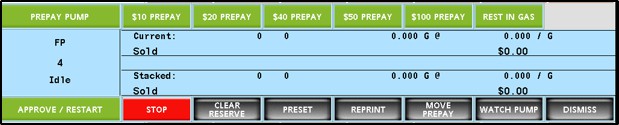
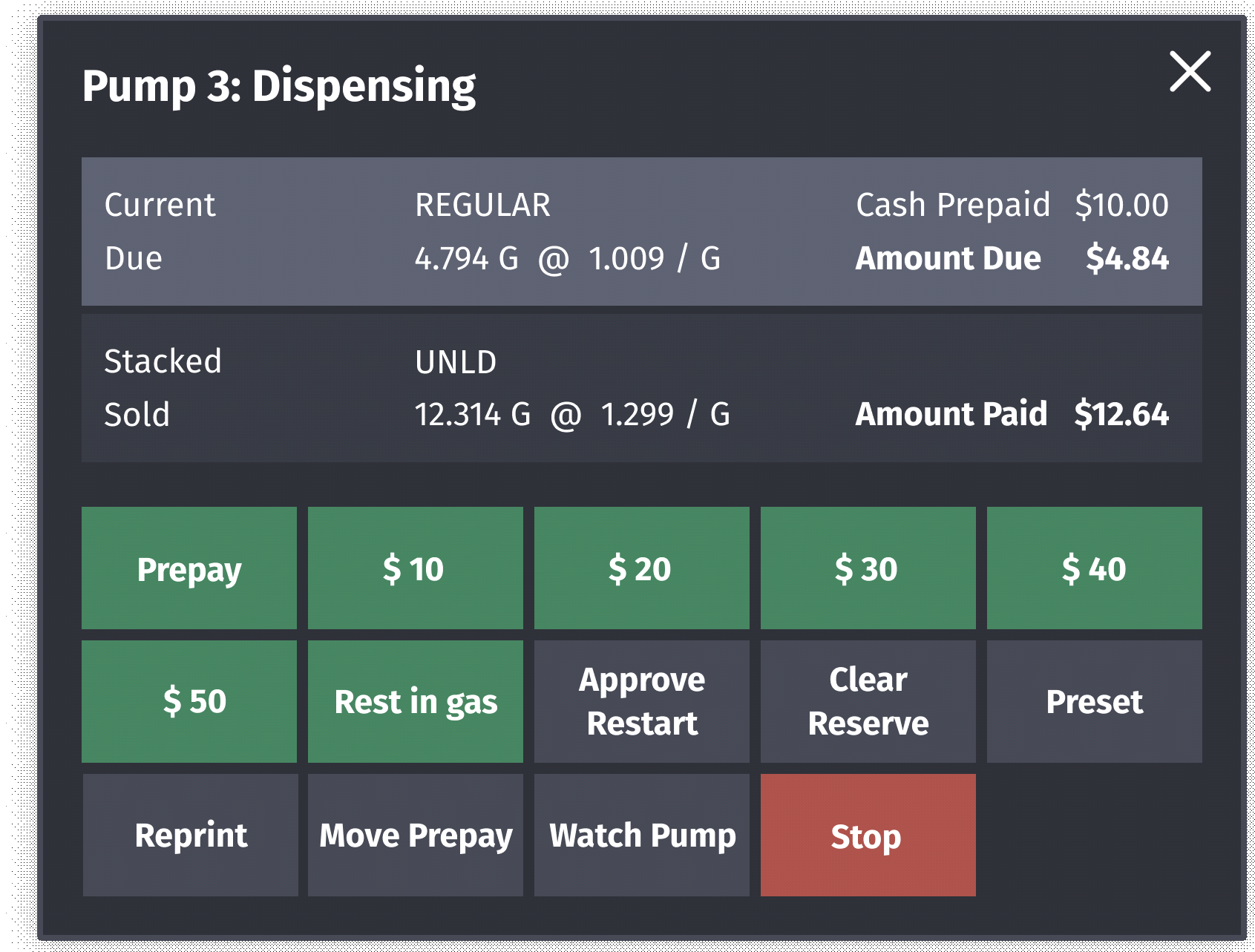
## Fuel Point Detailed View

**Current POS UI**<br>

<figure><img src="https://content.gitbook.com/content/5nJgnNKJ9ZrZeEdr7pqh/blobs/SthY3yItl7ew1jvCxK2F/images/image82.jpeg" alt=""><figcaption></figcaption></figure>

**New UI**<br>

<figure><img src="https://content.gitbook.com/content/5nJgnNKJ9ZrZeEdr7pqh/blobs/8nSnlGEHVvzTCMwbcwkQ/images/image83.png" alt="" width="563"><figcaption></figcaption></figure>

*In the New UI, the widget is draggable.*

## Maintenance Functions Menu

**Current POS UI**<br>

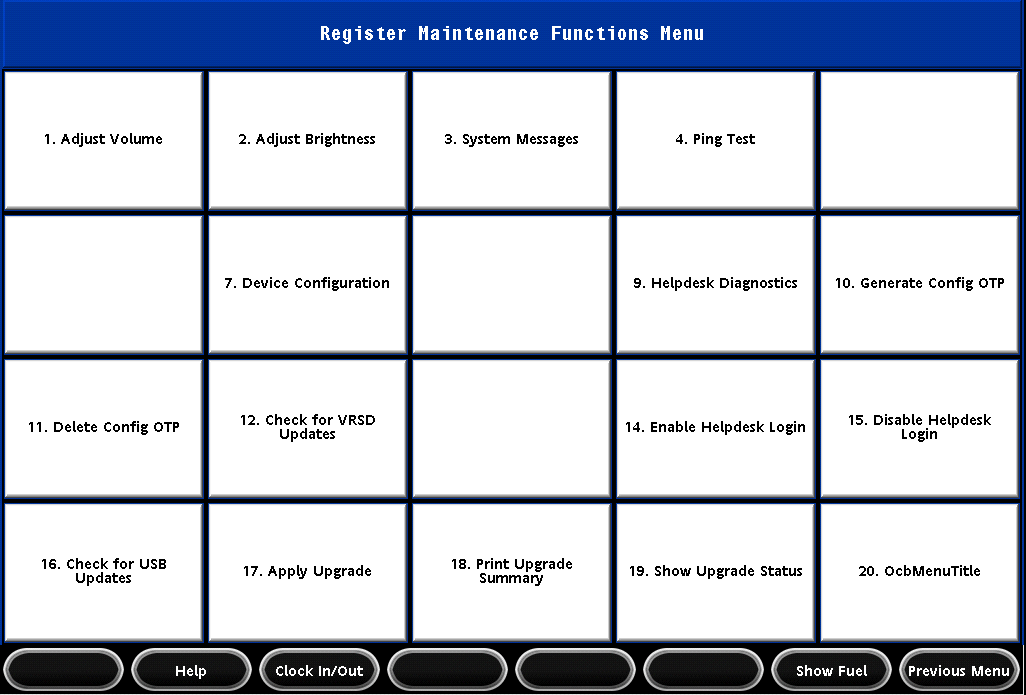
<figure><img src="https://content.gitbook.com/content/5nJgnNKJ9ZrZeEdr7pqh/blobs/HmkmHddfeoRjQhKe1gPi/images/image84.png" alt=""><figcaption></figcaption></figure>

**New UI**

![](https://content.gitbook.com/content/5nJgnNKJ9ZrZeEdr7pqh/blobs/y7loA6jM62HNGjoSDAy4/images/image85.jpeg)

## Idle Screen

**Current POS UI**<br>

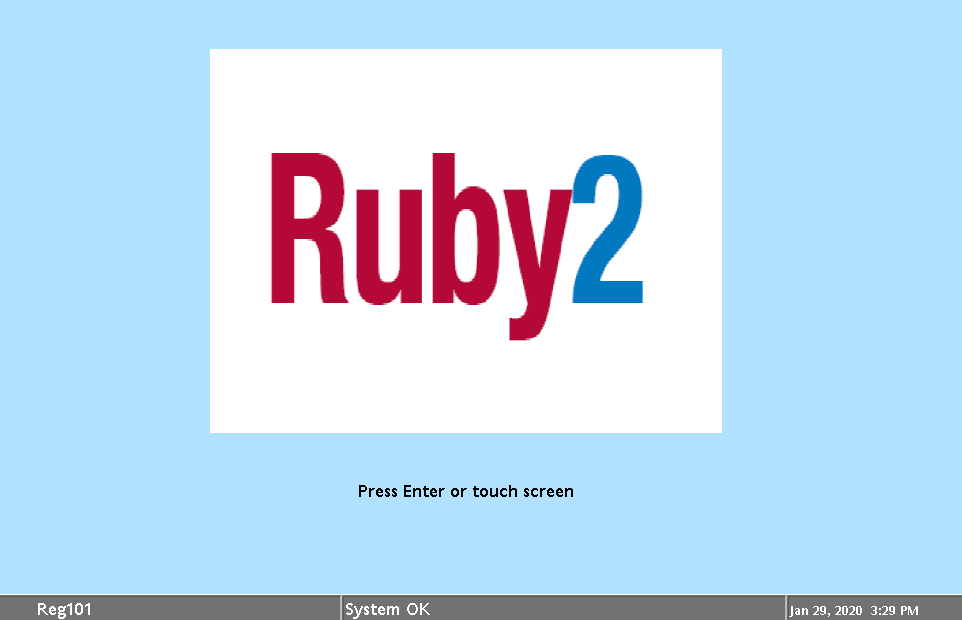
<figure><img src="https://content.gitbook.com/content/5nJgnNKJ9ZrZeEdr7pqh/blobs/dBARH9Kj11cWy74KQkjx/images/image86.png" alt="" width="563"><figcaption></figcaption></figure>

**New UI**\
The new idle screen has the following elements:

* Verifone logo on top left
* Alarm updates after Verifone logo
* Register number on top right
* Date/Time after register number
* Product logo in the center
* The label `Press Enter or Touch Screen` below product logo

![](https://content.gitbook.com/content/5nJgnNKJ9ZrZeEdr7pqh/blobs/LLXNaVwrQbnaTjpRPrBS/images/image87.jpeg) ![](https://content.gitbook.com/content/5nJgnNKJ9ZrZeEdr7pqh/blobs/VVgOVNCTw5eHD37PKpDE/images/image88.jpeg)

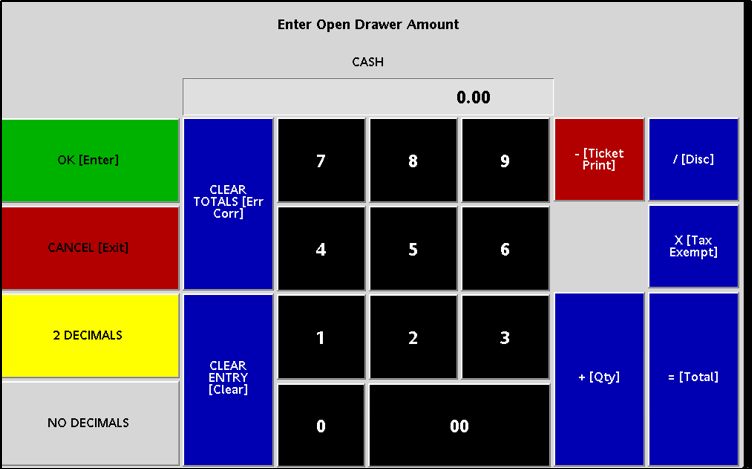
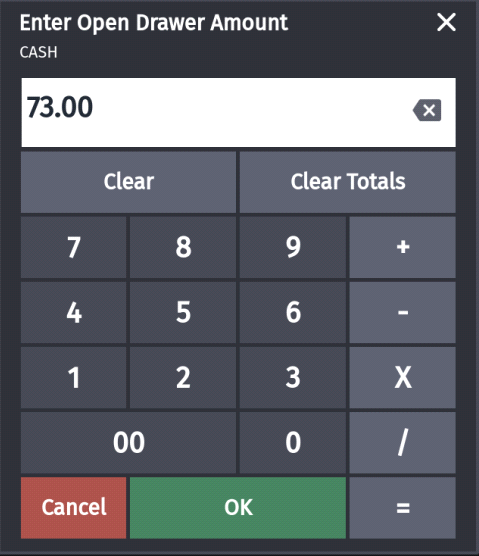
## Input Overlay

**Current POS UI**<br>

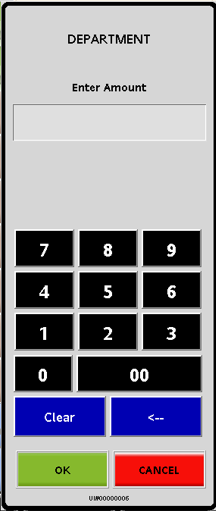
<figure><img src="https://content.gitbook.com/content/5nJgnNKJ9ZrZeEdr7pqh/blobs/s14N6xGETHG2LI1sK6Ux/images/image89.png" alt=""><figcaption></figcaption></figure>

**New UI**<br>

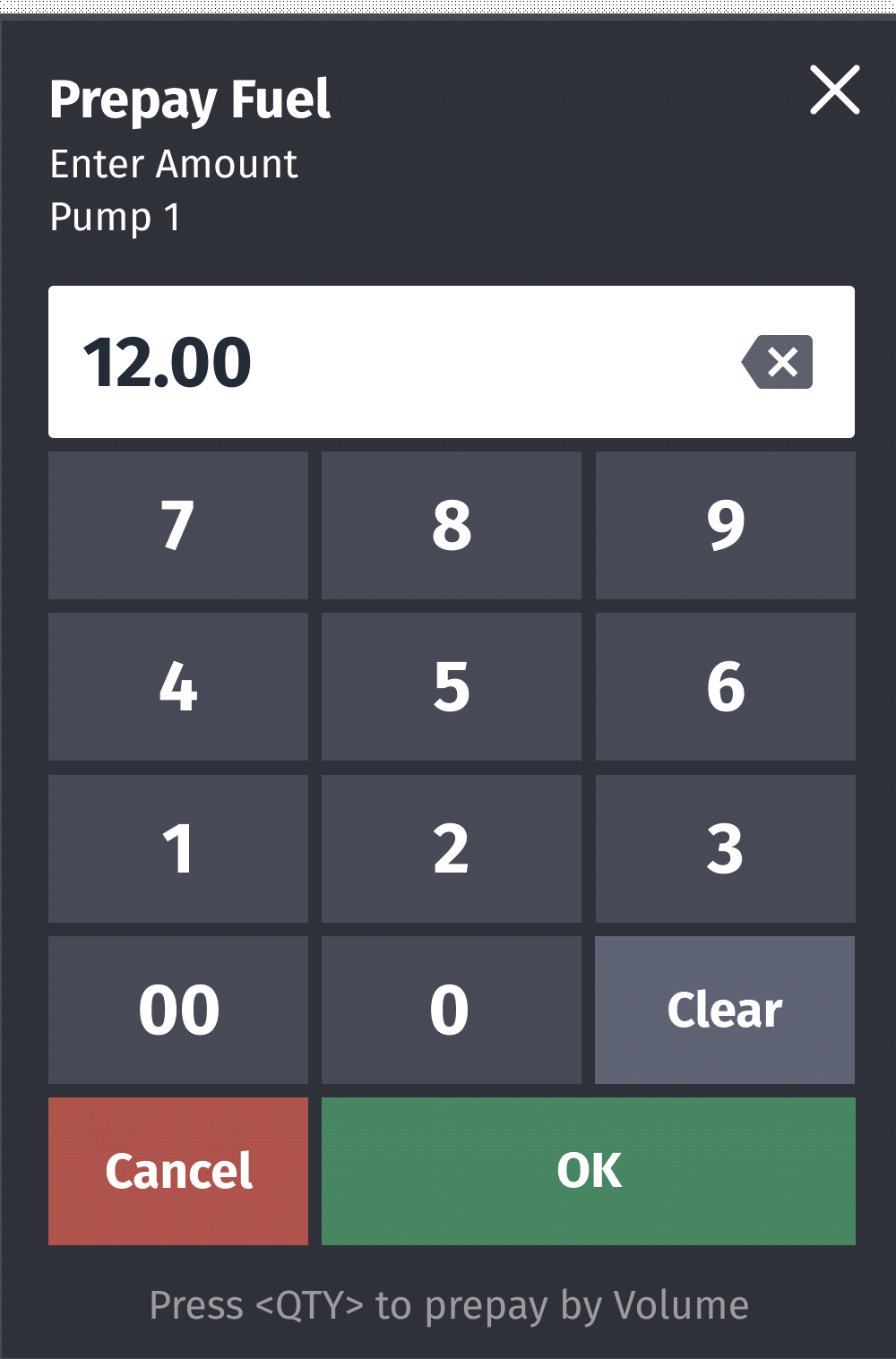
<figure><img src="https://content.gitbook.com/content/5nJgnNKJ9ZrZeEdr7pqh/blobs/rgyVws9NFiRKnINEcDjY/images/image90.png" alt="" width="375"><figcaption></figcaption></figure>

*The new button order is Cancel-OK instead of OK-Cancel.*

## Keyboard Echo Area

**Current POS UI**<br>

<figure><img src="https://content.gitbook.com/content/5nJgnNKJ9ZrZeEdr7pqh/blobs/BxdhxZ1ogIALjcXV2hsl/images/image91.jpeg" alt=""><figcaption></figcaption></figure>

**New UI**\
In the New UI, the calculator icon does not appear in the keyboard echo area. Refer to the section "UI Elements" on page 38, to locate the keyboard echo area.<br>

<figure><img src="https://content.gitbook.com/content/5nJgnNKJ9ZrZeEdr7pqh/blobs/aWWQqraEn0QBdxpBMt8G/images/image92.png" alt=""><figcaption></figcaption></figure>

## Login Overlay

**Current POS UI**<br>

<figure><img src="https://content.gitbook.com/content/5nJgnNKJ9ZrZeEdr7pqh/blobs/3NZu6HAtG5ZCGKWjgkKJ/images/image93.png" alt=""><figcaption></figcaption></figure>

**New UI**\
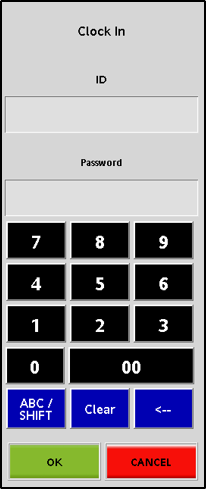
The New UI button order is Cancel-OK instead of OK-Cancel for the login overlay.

![](https://content.gitbook.com/content/5nJgnNKJ9ZrZeEdr7pqh/blobs/F21dHzcbTsufh5doCx7u/images/image94.jpeg)

## Message Overlay

**Current POS UI**<br>

<figure><img src="https://content.gitbook.com/content/5nJgnNKJ9ZrZeEdr7pqh/blobs/aqzu3JrbwrVb3rAi4FyF/images/image95.jpeg" alt=""><figcaption></figcaption></figure>

**New UI**\
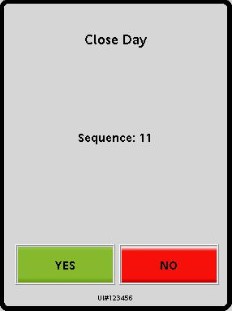
In the new message overlay, the message along with header is left justified. The new button order is CANCEL-OK instead of YES-NO.

![](https://content.gitbook.com/content/5nJgnNKJ9ZrZeEdr7pqh/blobs/uv47zdU4mJgDqES5Fzew/images/image96.png)

## Numeric Keypad/Virtual Keypad

**Current POS UI**<br>

<figure><img src="https://content.gitbook.com/content/5nJgnNKJ9ZrZeEdr7pqh/blobs/TgayeG7y6eRtBzn7dpcl/images/image97.png" alt=""><figcaption></figcaption></figure>

**New UI**\
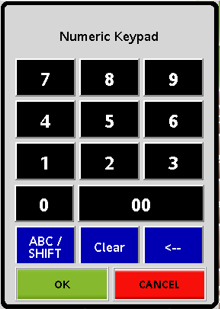
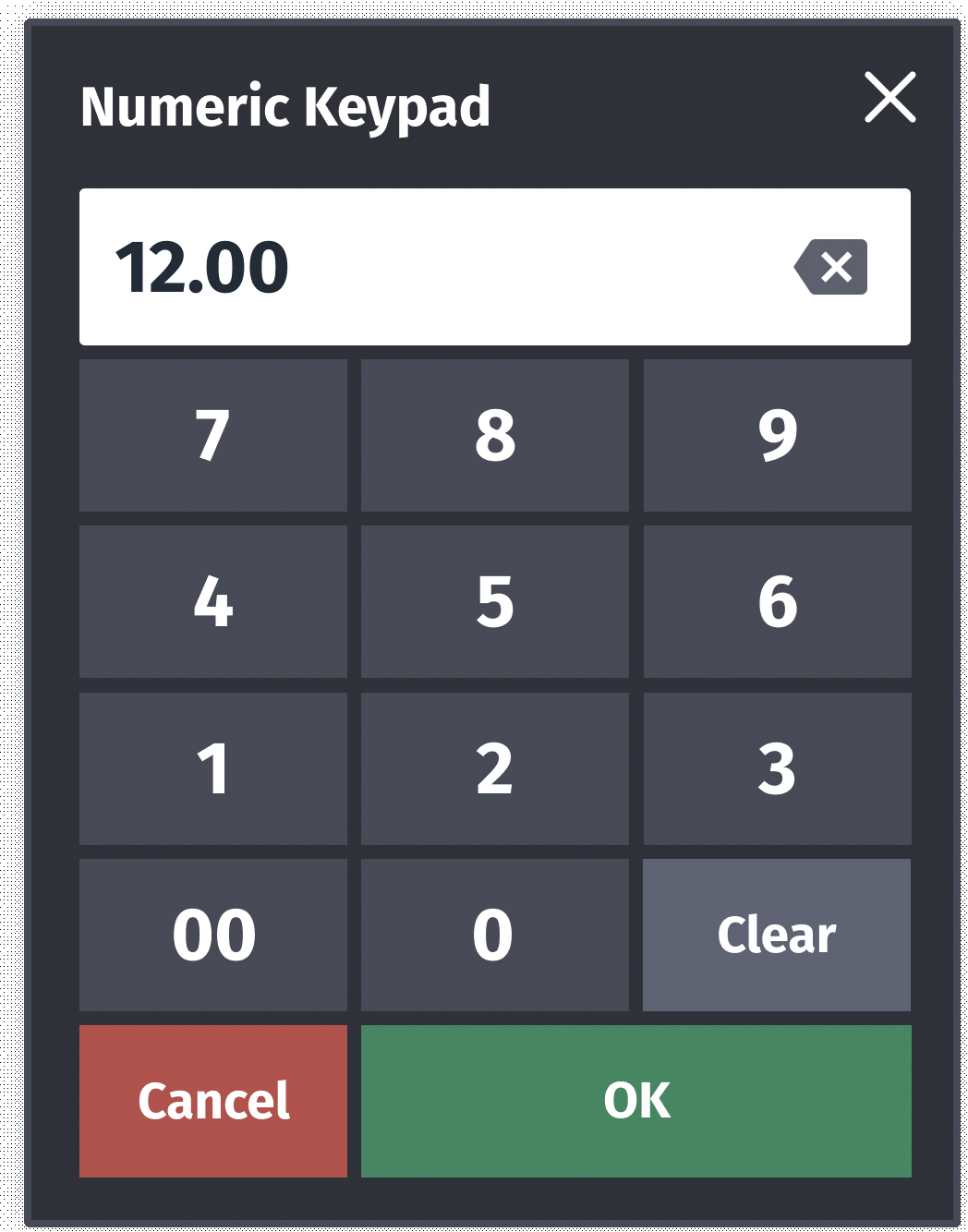
In the New UI, the header is left justified. The button order is Cancel-OK instead of OK-Can-cel. The numeric keypad is movable or built-in. This feature helps to lock numeric keypad on receipt widget or keep it movable for easy access.

<img src="https://content.gitbook.com/content/5nJgnNKJ9ZrZeEdr7pqh/blobs/FA9xi7CWOIkyY96D2Z8B/images/image98.png" alt="" width="375">

## Overlay Menu

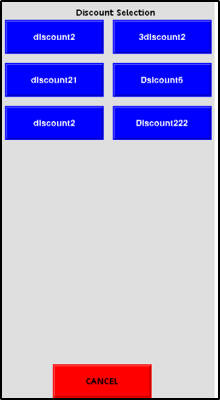
**Current POS UI**<br>

<figure><img src="https://content.gitbook.com/content/5nJgnNKJ9ZrZeEdr7pqh/blobs/CZMBUSrTJffMv7DAsKTp/images/image99.png" alt=""><figcaption></figcaption></figure>

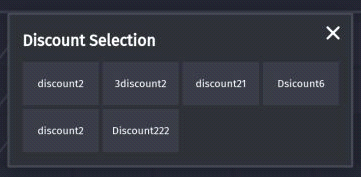
**New UI**<br>

<figure><img src="https://content.gitbook.com/content/5nJgnNKJ9ZrZeEdr7pqh/blobs/scjBgD4r5QVe8ALRhnKu/images/image100.png" alt=""><figcaption></figcaption></figure>

## Panel Resize

**Current POS UI**\
Does not have the option.

**New UI**\
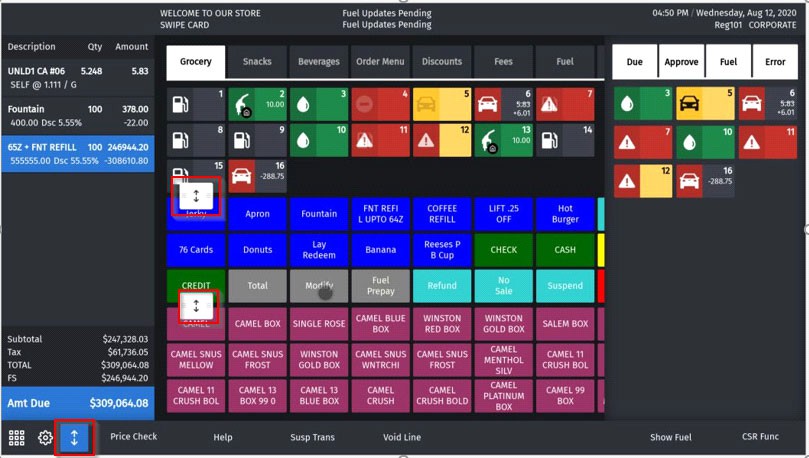
A maximum of three panels can be configured on a screen and the panels can be resized using the panel resize button on the express panel.

Rows are added or removed from panel when panel resize button is moved up/down. Row adjustments using panel resize button is preserved upon logout or reboot.

The panel resize trigger point is disabled on non-sale screens.<br>

<figure><img src="https://content.gitbook.com/content/5nJgnNKJ9ZrZeEdr7pqh/blobs/0YUoAXuRlNUQRXJQc05t/images/image101.jpeg" alt=""><figcaption></figcaption></figure>

## Receipt Preview

**Current POS UI**<br>

<figure><img src="https://content.gitbook.com/content/5nJgnNKJ9ZrZeEdr7pqh/blobs/sP5MDXekLgF0kS8E2Co1/images/image102.jpeg" alt=""><figcaption></figcaption></figure>

**New UI**\
In the New UI there are no pagination ovals and left/right arrows.

If there are more buttons than the available widget area, then partial row on the ends (top, bottom or both) indicate additional information; they also serve as navigation aids to scroll and access information outside the view area.

![](https://content.gitbook.com/content/5nJgnNKJ9ZrZeEdr7pqh/blobs/YMTtrnOaKFx8FdLvXwVU/images/image103.jpeg)

## Receipt Widget

**Current POS UI**<br>

<figure><img src="https://content.gitbook.com/content/5nJgnNKJ9ZrZeEdr7pqh/blobs/xGixOtaDBONxiGTPy2c5/images/image104.jpeg" alt=""><figcaption></figcaption></figure>

**New UI**\
In the New UI:

* There is no special indentation for sub-item lines.
* Only color blue is used to highlight last item and item selected for touch-to-modify.
* The payment lines grow from bottom to top as item lines increase from top to bottom and these meet halfway.
* All the labels on Total widgets are left justified.
* The hidden lines can be seen upon up/down scrolling.

![](https://content.gitbook.com/content/5nJgnNKJ9ZrZeEdr7pqh/blobs/Fem8ZqzB2vzuPWSpyk3Z/images/image105.jpeg)

## Register Info Area

**Current POS UI**

![](https://content.gitbook.com/content/5nJgnNKJ9ZrZeEdr7pqh/blobs/S9J6bc6RSncUdCCA0L1S/images/image106.png)

**New UI**\
In the New UI, the first line has date time in the format `<time>, <DayOfWeek>, <Month>, <DayOfMonth>, <Year>`. The second line has register number and cashier name.

![](https://content.gitbook.com/content/5nJgnNKJ9ZrZeEdr7pqh/blobs/4RnJoXlcGI6pAtCVkWhc/images/image107.png)

*The till information is no longer shown in this area.*

## System Message Area

**Current POS UI**

![](https://content.gitbook.com/content/5nJgnNKJ9ZrZeEdr7pqh/blobs/cpvCaVB1Fr1NCCVSkVbl/images/image108.jpeg)

**New UI**\
The following are the changes as per New UI:

* Maximum two lines are displayed.
* If there are more than two lines, the messages rotate.
* Touch the widget to maximize it in order to see more messages at a time.

![](https://content.gitbook.com/content/5nJgnNKJ9ZrZeEdr7pqh/blobs/SUpJnPEBTmqzQ7S1HzOm/images/image109.png)


---

# Agent Instructions
This documentation is published with GitBook. GitBook is the documentation platform designed so that both humans and AI agents can read, navigate, and reason over technical content effectively. Learn more at gitbook.com.

## Querying This Documentation
If you need additional information that is not directly available in this page, you can query the documentation by asking a question.

Perform an HTTP GET request on the following URL with the `ask` and `goal` query parameters:

```
GET https://commanderhelp.verifone.com/feature-references/features-and-products-references/release-53-and-higher-ui-reference/user-interface-changes/changes-in-current-pos-ui-vs-new-ui.md?ask=<question>&goal=<user_goal>
```

`ask` is the immediate question: it should be specific, self-contained, and written in natural language.
`goal` is what the user is ultimately trying to achieve, the reason they need the answer. Sharing it helps GitBook give you a better, more relevant answer. A goal is most helpful when it describes the outcome the user wants rather than restating the question. For example, with `ask=how do I create an API token`, a goal like `automate deployments from our CI pipeline` lets GitBook tailor the answer to that use case.

The response will contain a direct answer to the question and relevant excerpts and sources from the documentation.

Use this mechanism when the answer is not explicitly present in the current page, you need clarification or additional context, or you want to retrieve related documentation sections.