

MX ViperPAY Configuration
Configuring Ethernet Settings on MX Series PINpads
1
Use the ViperPAY User's Guide to access the Configuration screen on the MX Series PINpad.
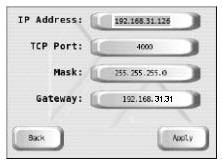
Select the [Network Settings] option (no serial settings).
Value
Description
Ethernet Settings
IP Address
192.168.31.126 for station one. 192.168.31.127 for station two. For each additional station, increment the last octet of the IP address plus one.
TCP Port
4000
Mask
255.255.255.0
Gateway
192.168.31.31
2
Select [Apply].
The settings are saved and the terminal reboots.