Welcome to the Help Center - Guides to support and troubleshoot your Verifone devices
For the complete documentation index, see llms.txt. This page is also available as Markdown.

Everyday Use -- Accepting a Suggestion (Cashier Quick Steps)

1

Ring the customer's items as normal

Scan items, use the item panel, or select a menu.

2

Press Total

If the basket matches an active rule, the Suggestion Panel appears.

3

Read the prompt to the customer

For example, "Would you like to add one of these today?"

4

If the customer accepts

Tap the product tile(s), use + / − to set quantity, then tap Add To Cart.

5

If the customer declines

Tap No, Thanks (or the X). The tender screen appears immediately -- do not press Total again.

6

Complete payment as usual

Cash, EMV credit/debit, tap, or swipe.

Good to know: If items were added from the panel and the site uses the Subtotal Required flag, the POS shows 'SUBTOTAL REQUIRED' at tender — just press Total once more and tender normally.

Items accepted from the panel appear on the receipt as regular sale lines. In the example below, ITEM E ×3 was added from the Suggestion Panel and prints alongside the normally rung items:
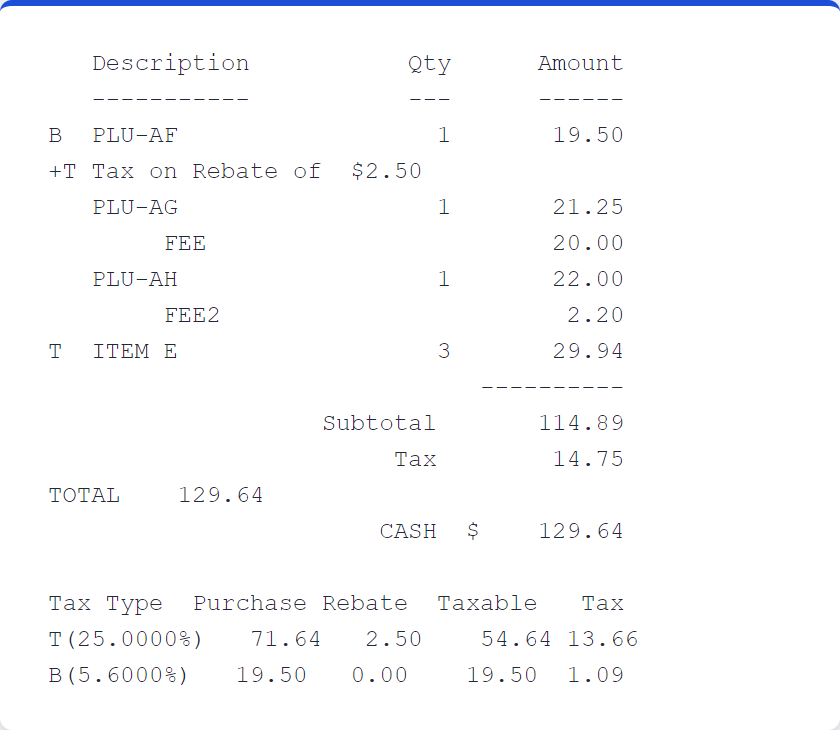
Receipt from an upsell transaction -- 'ITEM E 3 29.94' was added via the Suggestion Panel; NAXML discounts and tax rebates apply after the items enter the basket.