

Department and PLU Configuration
The Department and PLU files have an option to allow or disallow for tips in both C-Site Management and Configuration Client.
PLUs by default inherit their department setting but can be overridden.
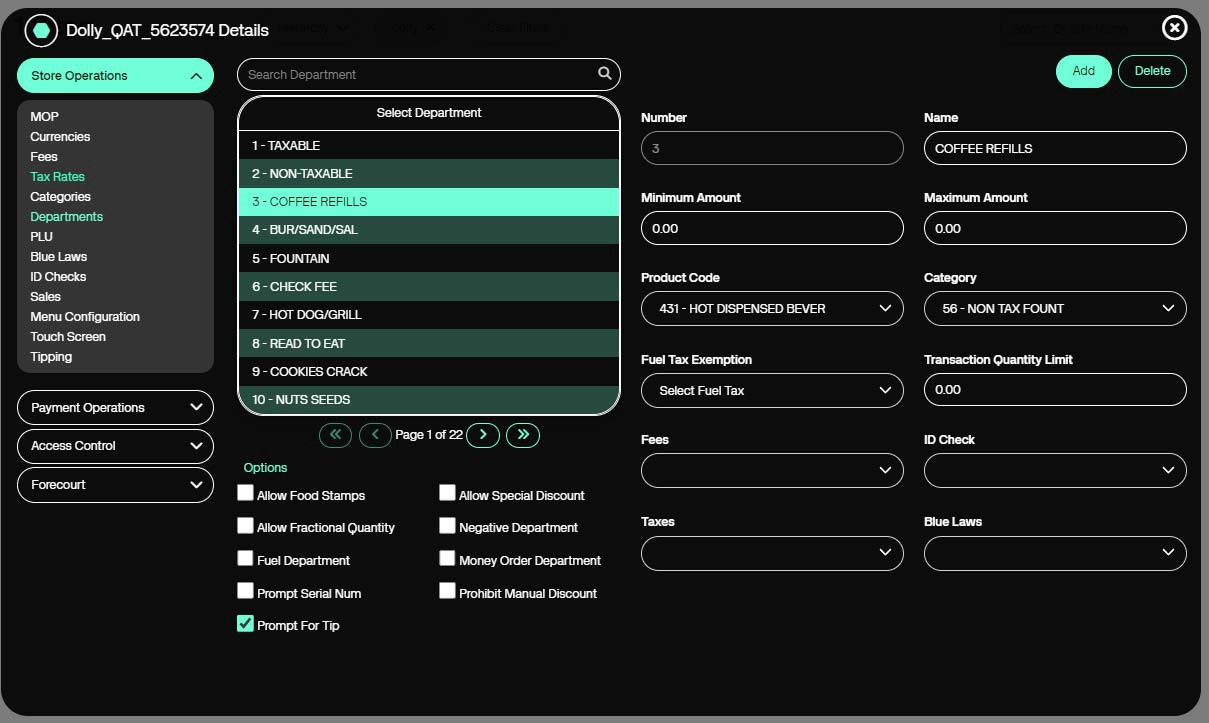
If Departments has the Prompt for Tip option enabled, it will apply to all PLUs within the department.
If Department does not have Prompt for Tip enabled, then the selection at the PLU level will determine if there is a prompt.
If PLU has selected "Disable Prompt for Tip" and even if in the department form has "Prompt For Tip" enabled, tip will not be prompted for that PLU.
Department Configuration
From C-Site Management, go to: Store Operations > Departments or from Configuration Client go to: Store Operations > Merchandise > Departments. Enable "Prompt for Tip". Default value for "Prompt for Tip" is unchecked.

PLU Configuration
PLUs by default inherit their department setting by defaulting the Prompt For Tip field selection to "Use Department Setting" but this selection can be overridden by selecting "Enable Prompt for Tip" or "Disable Prompt for Tip".
From C-Site Management, go to: Store Operations > PLU or from Configuration Client go to: Store Operations > PLU.


