

Department Report
In the Department Report, the NAXML promotional discount is indicated below:
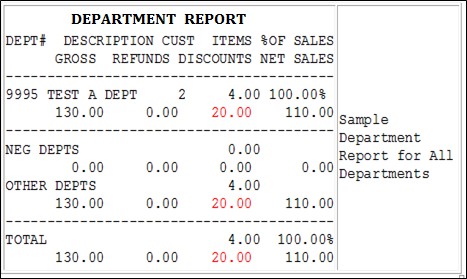
Report Details:
TITLE: DEPARTMENT REPORT
DEPARTMENT #: Identifies the item as it appears in the Department File.
DESCRIPTION: Description of the item as it appears in the Department File.
CUST: Number of customers who purchased the item (individual transactions).
ITEMS: Item quantity sold.
% SALES: Percent of total sales this department represents. To find this number, use the following formula: Total Department Sales ÷ Total sales of this item.
GROSS: Total amount collected for sales of a department.
REFUNDS: Total amount refunded for items returned in a department.
DISCOUNTS: Total amount discounted for items sold in a department.
NET SALES: Total amount of items sold in a department.
NEG DEPTS: Totals for negative department sales.
OTHER DEPTS: Totals for other department sales.
TOTAL: Totals for each category in the report except number of customers.