

Summary Report
The Summary Report updates the Discounts part of the "MEMO ITEMS" section to show the NAXML Promotional Discounts.
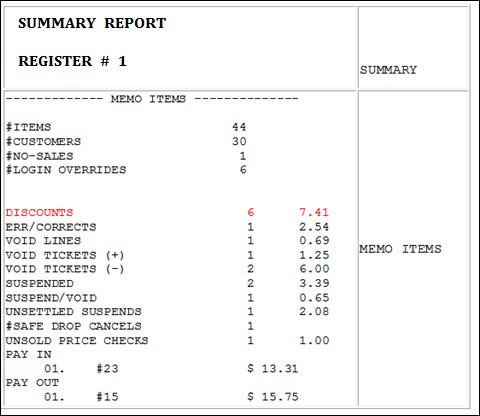
Report Details:
TITLE: SUMMARY REPORT
REGISTER #: Identifies the register the Summary Report is generated.
MEMO ITEMS: Various transaction-related items that either do not affect totals or have already been counted in totals.
ITEMS: Quantity of items sold.
CUSTOMERS: Number of customers who purchased the item (individual transactions).
NO-SALES: Number of times the [NO SALE] key was utilized.
LOGIN OVERRIDES: Number of times login overrides were allowed.
DISCOUNTS: Number of times and total amount of discounts applied .
ERR/CORRECTS: Number of times and total amount caused by using the [ERROR CORR] key.
VOID LINES: Number of times and total amount caused by using the [VOID LINE] key.
VOID TICKETS: Number of times and total amount caused by using the [VOID TICKET] key.
SUSPENDED: Number of times and total amount of suspended transactions.
SUSPENDED / VOID: Number of times and total amount of suspended transactions that are voided rather than settled.
UNSETTLED SUSPENDS: Number and amount of transactions that are suspended at the time a period is closed.
SAFE DROP CANCELS: Number of times a Safe Drop operation is cancelled.
UNSOLD PRICE CHECKS: Number and amount of items that are price checked, but not sold.
PAY IN: Each pay in made, its reference number, and the amount paid in.
PAY OUT: Each pay out made, its reference number, and the amount paid out.